

 Get started with your BloodHound Enterprise instance and start identifying and remediating security risks.
Prerequisites
To complete this quickstart, you must have a BloodHound Enterprise instance. To connect with the SpecterOps team and receive an instance, request a demo of BloodHound Enterprise.Get data into BloodHound
BloodHound Enterprise supports multiple data collection paths. Use the path that matches the directories and platforms you want to analyze:- Active Directory, collected by SharpHound Enterprise
- Entra ID (formerly Azure AD) and Azure IaaS, collected by AzureHound Enterprise
- Github, Jamf, and Okta, collected by OpenHound for BloodHound Enterprise
Ingest with SharpHound Enterprise (Active Directory)
SharpHound Enterprise collects multiple data types from Active Directory and its domain-joined systems. We recommend collecting all types for full risk identification and accurate risk assessment calculation.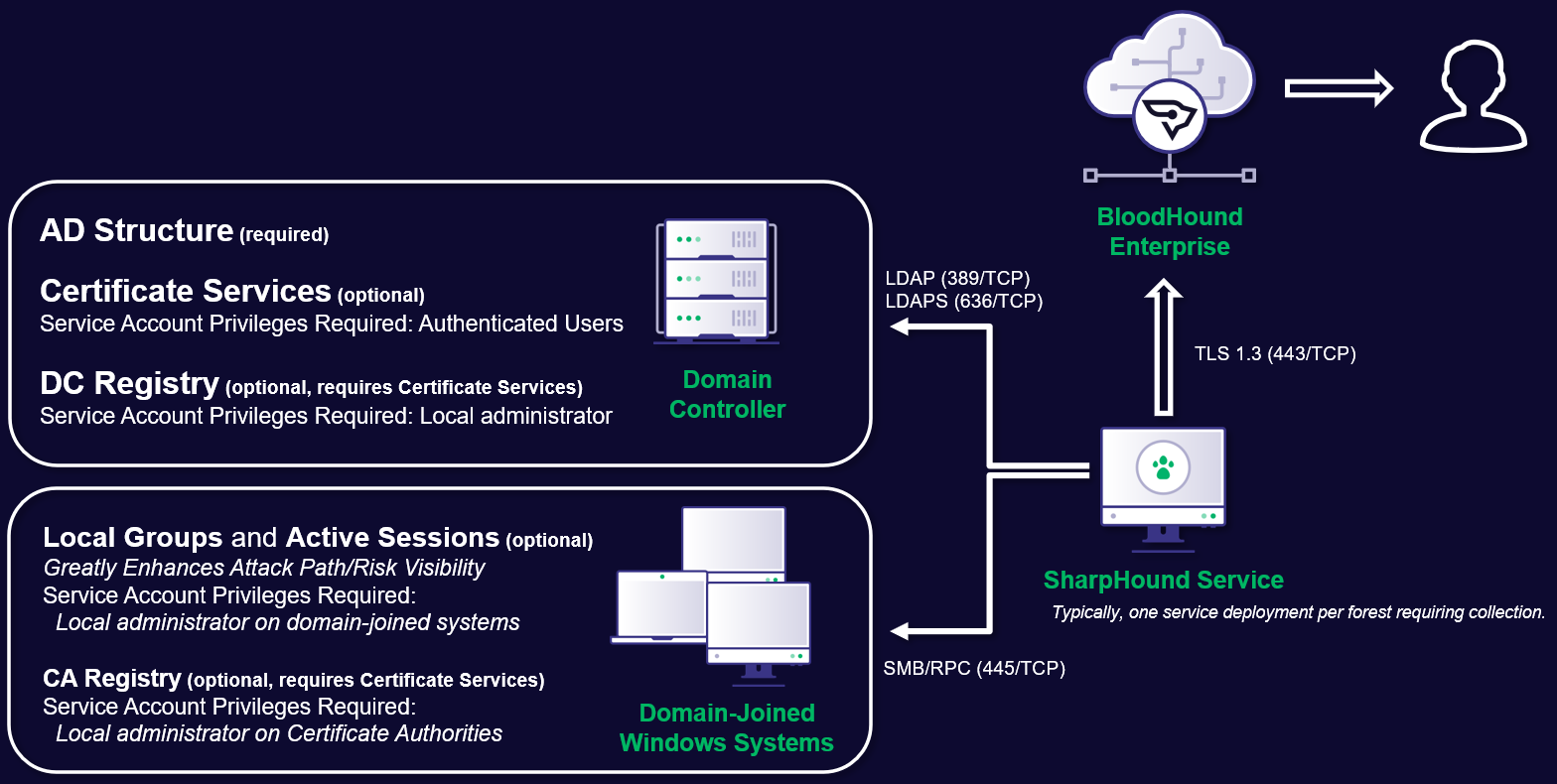
- Review the SharpHound Enterprise System Requirements and SharpHound Service Hardening Guidelines.
- Install and Upgrade SharpHound Enterprise.
- To fully secure a domain, collect data from all other domains with a trust relationship to it (in- and outgoing trust). Configure SharpHound Enterprise for Cross-Trust Collection.
Ingest with AzureHound Enterprise (Entra ID and Azure)
Install and run AzureHound Enterprise on Windows, Docker, or Kubernetes. When you deploy AzureHound Enterprise on Windows, it runs as a Windows service.- Review the AzureHound Enterprise System Requirements and Deployment Process.
- Configure Azure.
- Create your AzureHound configuration.
- Deploy and maintain AzureHound.
Ingest with OpenHound (Github, Jamf, and Okta)
OpenHound for BloodHound Enterprise runs as a containerized service and is complementary to SharpHound Enterprise and AzureHound Enterprise.This is a SpecterOps-managed feature. If it is not enabled in your environment, contact your account team for assistance.
- Review the OpenHound for BloodHound Enterprise configuration requirements.
- Create an OpenHound collector client to get API credentials.
- Configure the OpenHound collector you want to run:
- Deploy OpenHound in your environment and run an on-demand scan or scheduled collection.
Verify data quality
After collecting data, to verify data quality:- Go to settings (⚙️) → Administration and select Data Quality.
- Verify that each collector has collected the expected amount of data and that principal types match your expected coverage for each directory and platform.
- If using privileged collection, verify that the charts Local Group Completeness Over Time and Session Completeness Over Time report higher than 0%. Obtaining 100% completeness is not possible in most environments due to things like workstations being offline during collection.
- If you see lower-than-expected data quality examine the data collection logs and contact your SpecterOps representative if you need assistance.
Scope Tier Zero objects
BloodHound Enterprise identifies and prioritizes attack paths. To get the most accurate assessment scope your Tier Zero objects.Grant users access
Your BloodHound Enterprise instance has a few administrative users by default. To bring your team into your instance, grant your team access with dedicated users and roles. To grant users access to your instance, create users and set access control roles. BloodHound Enterprise supports two authentication methods for users:- Built-in authentication via username and password, supporting TOTP-based multi-factor authentication
- SAML 2.0-based Single-Sign-On
Explore and remediate attack paths
Go to the Attack Paths, Explore, and Posture pages to see identified attack paths, prioritization, and recommended mitigations.Next steps
- Learn how to work with the BloodHound Enterprise API
- Configure BloodHound integrations