> ## Documentation Index
> Fetch the complete documentation index at: https://bloodhound.specterops.io/llms.txt
> Use this file to discover all available pages before exploring further.
# 2026-05-06 Release Notes
> Learn about new features, enhancements, and fixed issues in BloodHound.
| | | | | |
| ----------- | -------------- | ------------- | -------------- | -------------- |
| **Release** | **BloodHound** | **OpenHound** | **SharpHound** | **AzureHound** |
| 2026-05-06 | v9.1.0 | No release | No release | v2.12.1 |
Use the filters on the right side of this page to narrow down the updates by component. You can select multiple filters at the same time to refine your results.
## Database Management
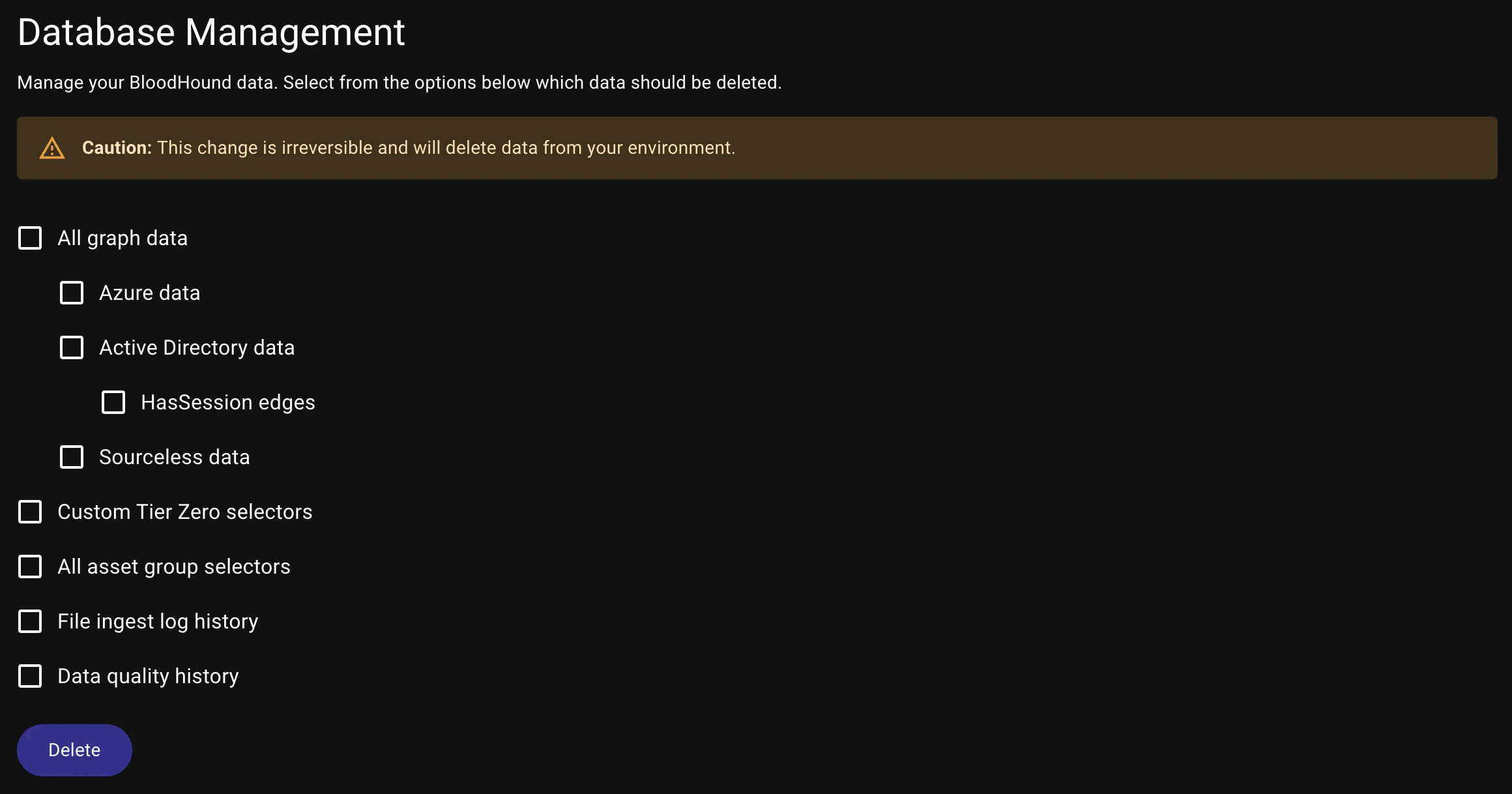
Manage graph cleanup tasks more predictably from the **Database Management** page.
The **HasSession** option has been nested within the **Active Directory** graph data source for a more consistent administration workflow.
 ## Cypher Query Results
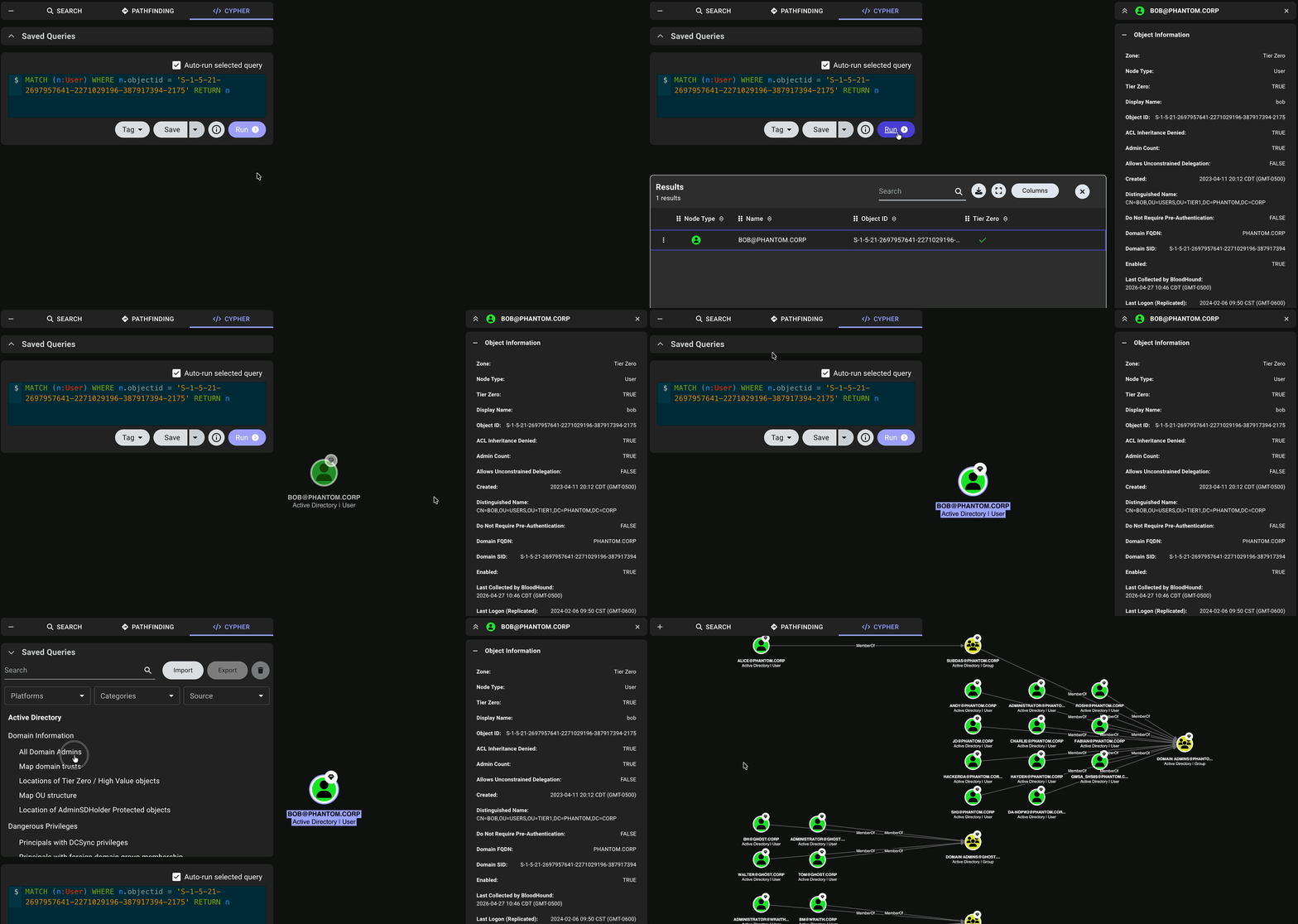
Work through Cypher query results with panel behavior that adapts to the number of returned nodes.
When a query returns a single node, the **Entity Panel** opens directly to that node and the Search, Pathfinding, and Cypher menu remains expanded.
When a query returns multiple nodes, the **Entity Panel** does not open and the Search, Pathfinding, and Cypher menu collapses to allow more space for the graph and to encourage selecting specific nodes of interest from the results.
## Cypher Query Results
Work through Cypher query results with panel behavior that adapts to the number of returned nodes.
When a query returns a single node, the **Entity Panel** opens directly to that node and the Search, Pathfinding, and Cypher menu remains expanded.
When a query returns multiple nodes, the **Entity Panel** does not open and the Search, Pathfinding, and Cypher menu collapses to allow more space for the graph and to encourage selecting specific nodes of interest from the results.
 ## Subcategories for Saved Queries
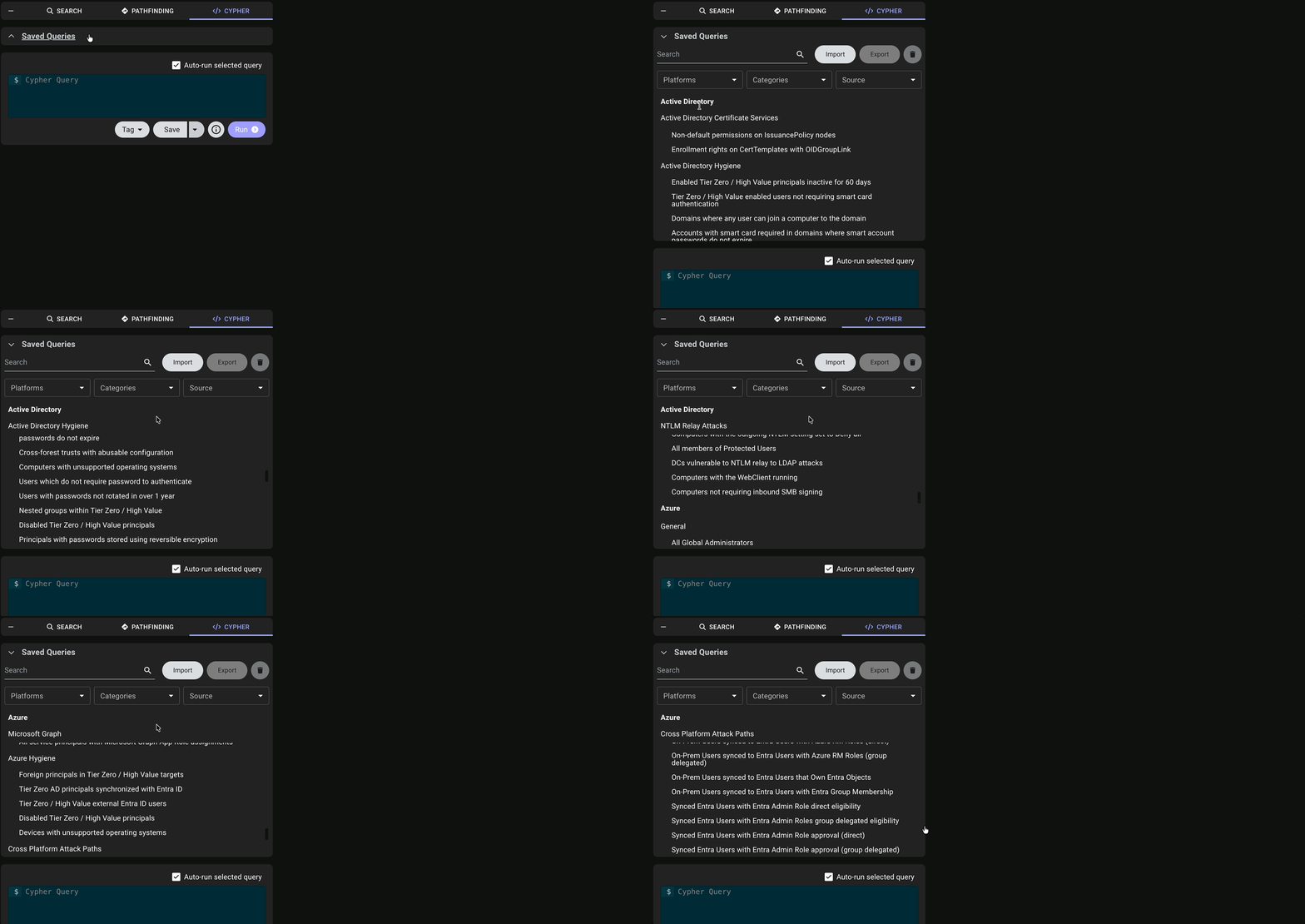
Scroll through **Saved Queries** with clearer subcategories and less repeated labeling.
## Subcategories for Saved Queries
Scroll through **Saved Queries** with clearer subcategories and less repeated labeling.
 ## Entity Panel Controls
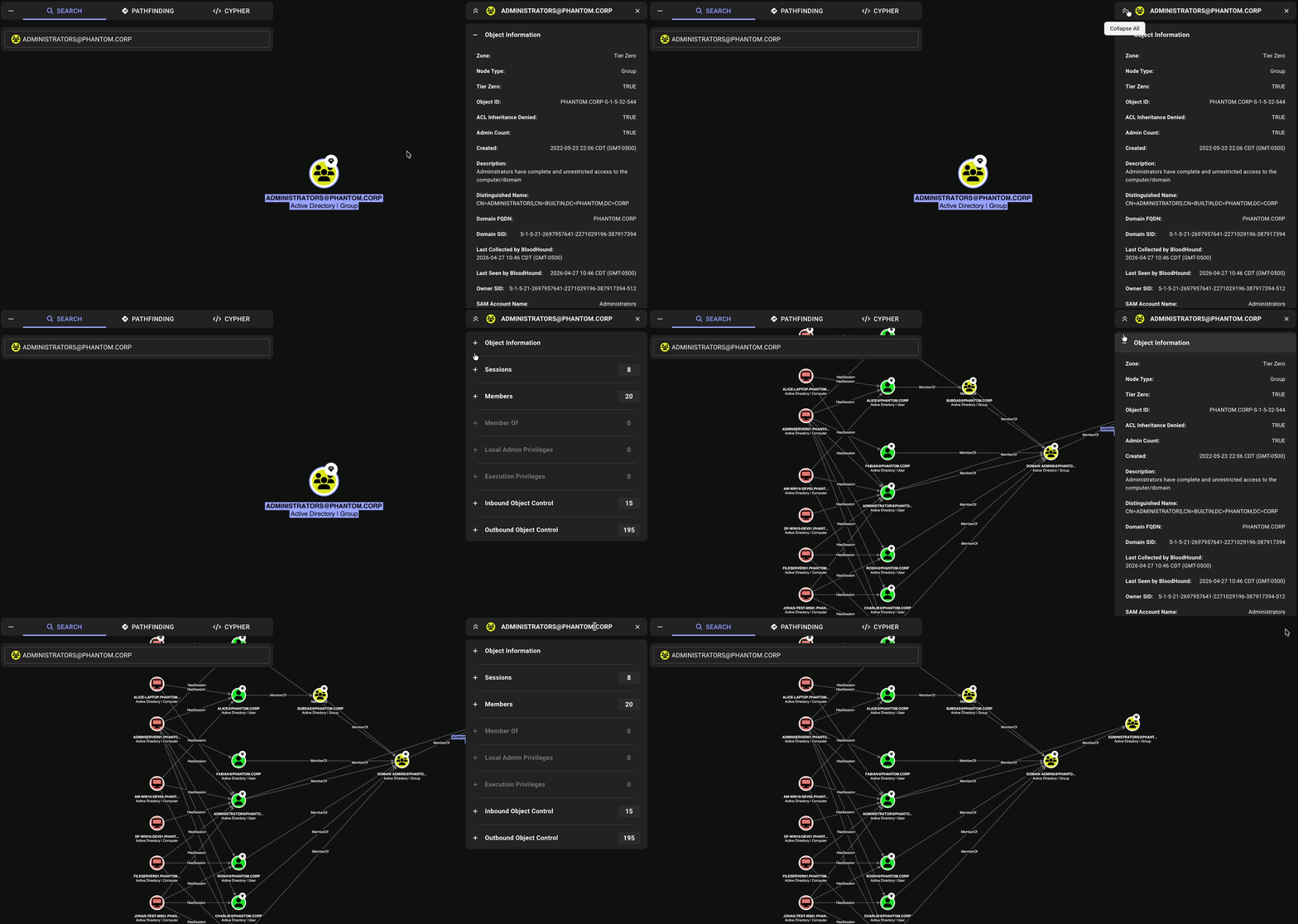
The **Entity Panel** now has collapse controls on the left and close controls on the right for more intuitive interaction and to reduce accidental panel closures.
## Entity Panel Controls
The **Entity Panel** now has collapse controls on the left and close controls on the right for more intuitive interaction and to reduce accidental panel closures.
 ## Custom Icons
Designate the default icon and color for nodes matching a given kind in an OpenGraph data payload.
BloodHound now uses the `"is_display_kind": true` field in an extension definition schema's `node_kinds` array to determine which icon and color to apply to matching nodes in the graph.
## Extension Management API
Manage OpenGraph extensions with more granular read and write permissions.
Extension management now provides separate permissions for extension schema administration and related data access:
* Users with the Power User, Auditor, User, and Read-only roles can view installed extensions, including associated findings and edges.
* Only users with the Administrator role can upload or delete extension definition schemas. The **Upload** and **Delete** extension buttons are disabled for all other roles.
See [User Role Definitions](/manage-bloodhound/auth/users-and-roles#user-role-definitions) for a full breakdown of OpenGraph extension permissions.
## Optimized Graph Indices
Graph query and path lookup operations are faster in this release due to improved index coverage on edge data.
BloodHound now uses optimized graph indices that cover the columns most frequently accessed during traversals, reducing the need for additional row lookups.
## Incremental Edge Updates
Post-processing runs faster and more efficiently for several edge types in this release.
BloodHound now updates the following edges incrementally only, writing changes when edges are added or removed instead of deleting and recreating all edges of each type during every post-processing run:
* [`Owns`](/resources/edges/owns)
* [`WriteOwner`](/resources/edges/write-owner)
* [`AZMGAddMember`](/resources/edges/az-mg-add-member)
* [`AZMGAddOwner`](/resources/edges/az-mg-add-owner)
* [`AZMGAddSecret`](/resources/edges/az-mg-add-secret)
* [`AZMGGrantAppRoles`](/resources/edges/az-mg-grant-app-roles)
* [`AZMGGrantRole`](/resources/edges/az-mg-grant-role)
## API and Authentication
* Resolved an issue where filtering in the **API Explorer** only matched endpoint tags and did not reliably include matching API paths.
* Resolved an issue where the **API Explorer** showed an outdated request example for [`POST /api/v2/clear-database`](/reference/database/delete-your-bloodhound-data) that did not include newer OpenGraph delete options.
* Resolved an issue where deleting a client through [`DELETE /api/v2/clients/{id}`](/reference/clients/delete-client) did not generate expected audit log entries.
* Resolved an issue where users created through SSO and OIDC sign-in did not consistently receive the correct [Environment Targeted Access Control (ETAC)](/manage-bloodhound/auth/environment-targeted-access-control) environment access based on their assigned role.
## Graph Processing
* Resolved Neo4j kind-handling issues where relationship types were not included when fetching available kinds from the database and edge deletion by kind could fail against Neo4j backends.
* Resolved an issue where cross-product analysis could return duplicated results when entities belonged to overlapping groups.
* Resolved an issue where certain Azure nodes could be misclassified as Active Directory groups based on SID-suffix matching during post-processing.
* Resolved an issue where [`AZAddOwner`](/resources/edges/az-add-owner) relationships were not created as expected during post-processing.
* Resolved an issue where histogram metric bucket count calculations for SharpHound data returned per-bucket counts instead of cumulative values.
## OpenGraph
* Resolved an issue where a single unresolved [`property_matchers`](/opengraph/developer/schema#match-by-property) array in an OpenGraph data payload could cause other valid payload entries to fail in the same file upload.
* Resolved an issue where OpenGraph extension installation recreated existing extensions and related records instead of performing a true upsert, causing unnecessary ID sequence churn even when no material schema changes were made.
* Resolved an issue where concurrent ingest and changelog flush activity could deadlock and interrupt processing, causing repeated `Error reading ingest file` failures.
* Resolved an issue where OpenGraph findings did not display severity color because severity values were not returned correctly.
* Resolved an issue where selecting the **All ``** filter did not correctly include all data scoped to an OpenGraph extension.
* Resolved an issue where object IDs could appear with an appended timestamp in the **Entity Panel** after specific OpenGraph node upsert sequences.
## Explore
* Resolved an issue where the space bar keyboard key was unresponsive in the **Cypher Query** editor.
* Resolved an issue where long edge names in the **Pathfinding Edge Filter** could overlap.
* Resolved an issue where help text contrast in the **Search** tab was too low in dark mode.
* Resolved an issue in BloodHound Community Edition where selected nodes could not be unselected to return the graph to a clear state.
* Resolved an issue where arrowheads in the graph could become visually misaligned when multiple edges connected the same nodes.
## Navigation and Table Layout
* Resolved an issue where multiple table views had inconsistent column header alignment.
* Resolved an issue where the BloodHound logo could shrink and eventually disappear as browser height decreased.
* Resolved an issue where the sidebar navigation area could become non-scrollable at reduced browser heights.
## Collection Reliability
* Resolved an issue where AzureHound could create incorrect [`AZContains`](/resources/edges/az-contains) edges across tenant boundaries.
* Resolved an issue where AzureHound jobs could appear to continue running after collection and ingest completed, resulting in inconsistent job state and follow-on failures.
## Custom Icons
Designate the default icon and color for nodes matching a given kind in an OpenGraph data payload.
BloodHound now uses the `"is_display_kind": true` field in an extension definition schema's `node_kinds` array to determine which icon and color to apply to matching nodes in the graph.
## Extension Management API
Manage OpenGraph extensions with more granular read and write permissions.
Extension management now provides separate permissions for extension schema administration and related data access:
* Users with the Power User, Auditor, User, and Read-only roles can view installed extensions, including associated findings and edges.
* Only users with the Administrator role can upload or delete extension definition schemas. The **Upload** and **Delete** extension buttons are disabled for all other roles.
See [User Role Definitions](/manage-bloodhound/auth/users-and-roles#user-role-definitions) for a full breakdown of OpenGraph extension permissions.
## Optimized Graph Indices
Graph query and path lookup operations are faster in this release due to improved index coverage on edge data.
BloodHound now uses optimized graph indices that cover the columns most frequently accessed during traversals, reducing the need for additional row lookups.
## Incremental Edge Updates
Post-processing runs faster and more efficiently for several edge types in this release.
BloodHound now updates the following edges incrementally only, writing changes when edges are added or removed instead of deleting and recreating all edges of each type during every post-processing run:
* [`Owns`](/resources/edges/owns)
* [`WriteOwner`](/resources/edges/write-owner)
* [`AZMGAddMember`](/resources/edges/az-mg-add-member)
* [`AZMGAddOwner`](/resources/edges/az-mg-add-owner)
* [`AZMGAddSecret`](/resources/edges/az-mg-add-secret)
* [`AZMGGrantAppRoles`](/resources/edges/az-mg-grant-app-roles)
* [`AZMGGrantRole`](/resources/edges/az-mg-grant-role)
## API and Authentication
* Resolved an issue where filtering in the **API Explorer** only matched endpoint tags and did not reliably include matching API paths.
* Resolved an issue where the **API Explorer** showed an outdated request example for [`POST /api/v2/clear-database`](/reference/database/delete-your-bloodhound-data) that did not include newer OpenGraph delete options.
* Resolved an issue where deleting a client through [`DELETE /api/v2/clients/{id}`](/reference/clients/delete-client) did not generate expected audit log entries.
* Resolved an issue where users created through SSO and OIDC sign-in did not consistently receive the correct [Environment Targeted Access Control (ETAC)](/manage-bloodhound/auth/environment-targeted-access-control) environment access based on their assigned role.
## Graph Processing
* Resolved Neo4j kind-handling issues where relationship types were not included when fetching available kinds from the database and edge deletion by kind could fail against Neo4j backends.
* Resolved an issue where cross-product analysis could return duplicated results when entities belonged to overlapping groups.
* Resolved an issue where certain Azure nodes could be misclassified as Active Directory groups based on SID-suffix matching during post-processing.
* Resolved an issue where [`AZAddOwner`](/resources/edges/az-add-owner) relationships were not created as expected during post-processing.
* Resolved an issue where histogram metric bucket count calculations for SharpHound data returned per-bucket counts instead of cumulative values.
## OpenGraph
* Resolved an issue where a single unresolved [`property_matchers`](/opengraph/developer/schema#match-by-property) array in an OpenGraph data payload could cause other valid payload entries to fail in the same file upload.
* Resolved an issue where OpenGraph extension installation recreated existing extensions and related records instead of performing a true upsert, causing unnecessary ID sequence churn even when no material schema changes were made.
* Resolved an issue where concurrent ingest and changelog flush activity could deadlock and interrupt processing, causing repeated `Error reading ingest file` failures.
* Resolved an issue where OpenGraph findings did not display severity color because severity values were not returned correctly.
* Resolved an issue where selecting the **All ``** filter did not correctly include all data scoped to an OpenGraph extension.
* Resolved an issue where object IDs could appear with an appended timestamp in the **Entity Panel** after specific OpenGraph node upsert sequences.
## Explore
* Resolved an issue where the space bar keyboard key was unresponsive in the **Cypher Query** editor.
* Resolved an issue where long edge names in the **Pathfinding Edge Filter** could overlap.
* Resolved an issue where help text contrast in the **Search** tab was too low in dark mode.
* Resolved an issue in BloodHound Community Edition where selected nodes could not be unselected to return the graph to a clear state.
* Resolved an issue where arrowheads in the graph could become visually misaligned when multiple edges connected the same nodes.
## Navigation and Table Layout
* Resolved an issue where multiple table views had inconsistent column header alignment.
* Resolved an issue where the BloodHound logo could shrink and eventually disappear as browser height decreased.
* Resolved an issue where the sidebar navigation area could become non-scrollable at reduced browser heights.
## Collection Reliability
* Resolved an issue where AzureHound could create incorrect [`AZContains`](/resources/edges/az-contains) edges across tenant boundaries.
* Resolved an issue where AzureHound jobs could appear to continue running after collection and ingest completed, resulting in inconsistent job state and follow-on failures.