> ## Documentation Index
> Fetch the complete documentation index at: https://bloodhound.specterops.io/llms.txt
> Use this file to discover all available pages before exploring further.
# 2026-01-22 Release Notes
> Learn about new features, enhancements, and fixed issues in BloodHound.
| | | | |
| ----------- | -------------- | -------------- | -------------- |
| **Release** | **BloodHound** | **SharpHound** | **AzureHound** |
| 2026-01-22 | v8.5.0 | v2.9.0 | v2.8.3 |
Use the filters on the right side of this page to narrow down the updates by component. You can select multiple filters at the same time to refine your results.
## Keyboard Shortcuts
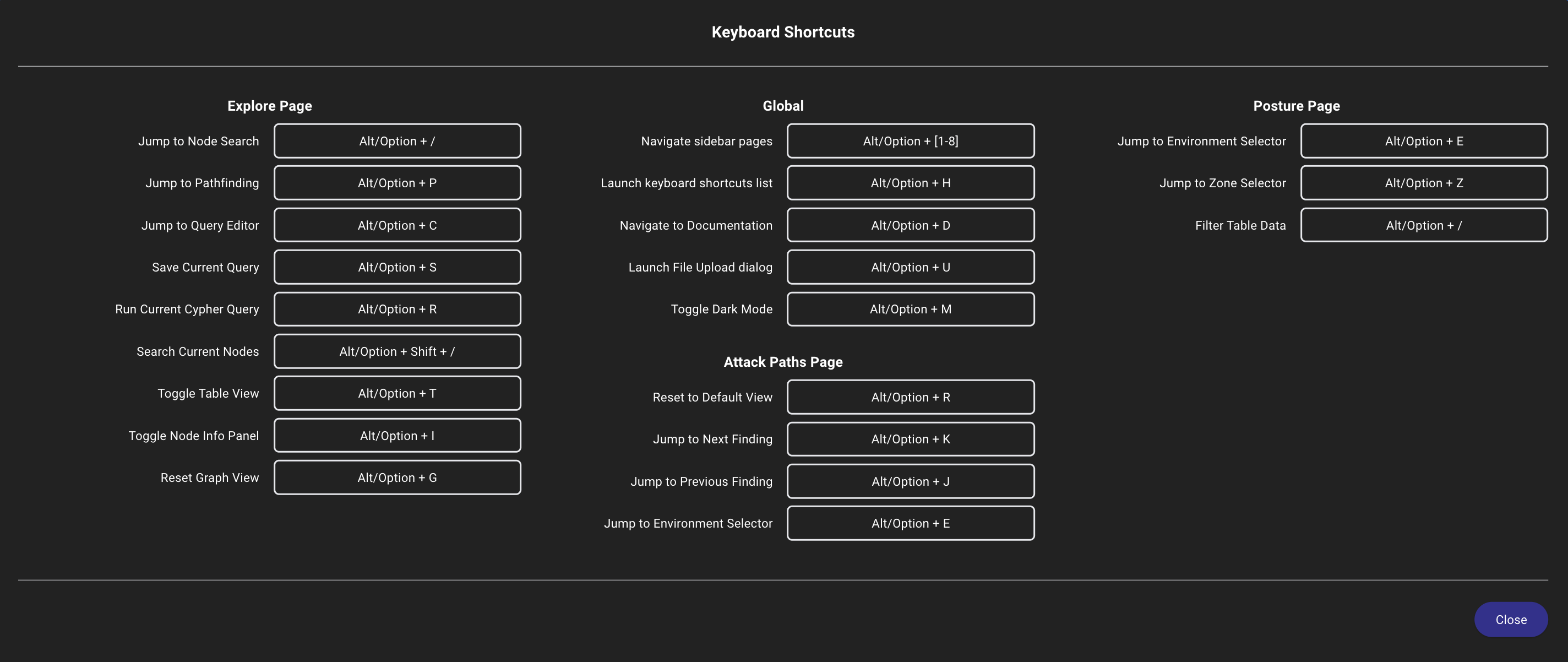
Navigate and interact with BloodHound using keyboard shortcuts.
BloodHound now includes a variety of [keyboard shortcuts](/manage-bloodhound/bh-shortcuts) to enhance navigation and streamline interactions across the platform.
These shortcuts allow you to quickly access features, execute commands, and navigate between pages without relying solely on mouse input, improving accessibility and efficiency for power users.
 ## Count by Kind for Selectors
Retrieve member counts by primary kind for asset group tag selectors using a new API endpoint.
The BloodHound API now includes a [List asset group tag selector member count by kind](/reference/asset-isolation/list-asset-group-tag-selector-member-count-by-kind) endpoint, allowing you to retrieve counts of members categorized by their primary kind (e.g., user, computer, group) for a specified asset group tag selector.
## Filter Asset Group Tag Members
Refine member results for a specific asset group tag.
The following endpoints now support filtering by `primary_kind`, `name`, and `object_id`:
* [List asset group tag members by ID](/reference/asset-isolation/list-asset-group-tag-members-by-id)
* [List asset group tag members by selector](/reference/asset-isolation/list-asset-group-tag-members-by-selector)
## Search Asset Group Tags
Narrow global search results to a single asset group tag.
The [Search Asset Group Tags](/reference/asset-isolation/search-asset-group-tags) API request body now accepts an optional `asset_group_tag_id` filter so you can target a single asset group tag.
## Selector Type Counts
Get a clearer picture of selector coverage for each asset group tag.
The [Get Asset Group Tags](/reference/asset-isolation/get-asset-group-tags) API now returns counts for total selectors, plus breakdowns of custom, default, and disabled selectors alongside member counts.
## Cypher
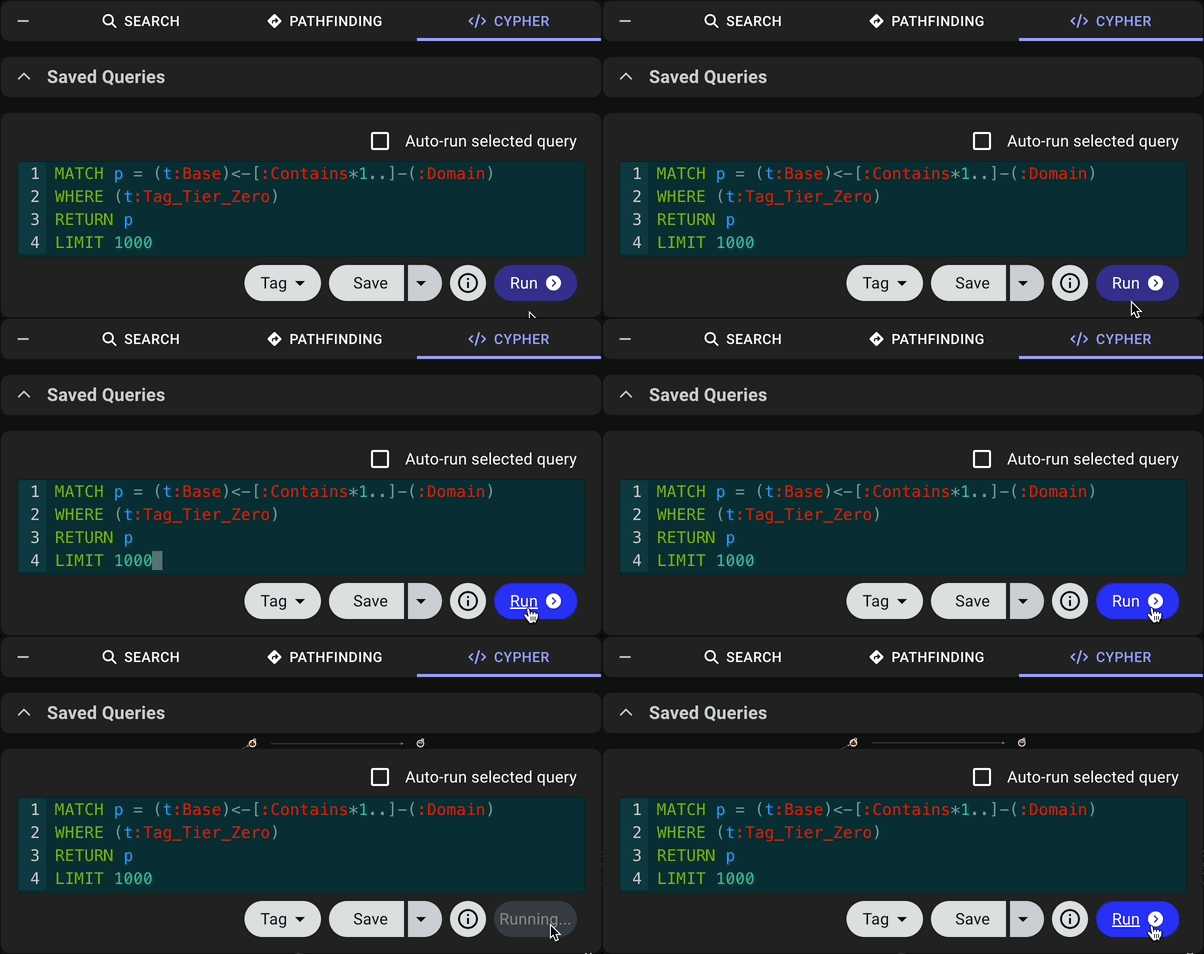
See the progress of Cypher queries with enhanced visual feedback.
The **Run** button in the [Cypher](/analyze-data/cypher-search) search tab now provides a *Running...* status that indicates when a query is in progress, improving the overall query execution experience.
## Count by Kind for Selectors
Retrieve member counts by primary kind for asset group tag selectors using a new API endpoint.
The BloodHound API now includes a [List asset group tag selector member count by kind](/reference/asset-isolation/list-asset-group-tag-selector-member-count-by-kind) endpoint, allowing you to retrieve counts of members categorized by their primary kind (e.g., user, computer, group) for a specified asset group tag selector.
## Filter Asset Group Tag Members
Refine member results for a specific asset group tag.
The following endpoints now support filtering by `primary_kind`, `name`, and `object_id`:
* [List asset group tag members by ID](/reference/asset-isolation/list-asset-group-tag-members-by-id)
* [List asset group tag members by selector](/reference/asset-isolation/list-asset-group-tag-members-by-selector)
## Search Asset Group Tags
Narrow global search results to a single asset group tag.
The [Search Asset Group Tags](/reference/asset-isolation/search-asset-group-tags) API request body now accepts an optional `asset_group_tag_id` filter so you can target a single asset group tag.
## Selector Type Counts
Get a clearer picture of selector coverage for each asset group tag.
The [Get Asset Group Tags](/reference/asset-isolation/get-asset-group-tags) API now returns counts for total selectors, plus breakdowns of custom, default, and disabled selectors alongside member counts.
## Cypher
See the progress of Cypher queries with enhanced visual feedback.
The **Run** button in the [Cypher](/analyze-data/cypher-search) search tab now provides a *Running...* status that indicates when a query is in progress, improving the overall query execution experience.
 ## OpenGraph Node Search
Find OpenGraph nodes faster with improved search functionality.
BloodHound now supports searching for OpenGraph nodes in the [Search](/analyze-data/explore/search) tab on the **Explore** page, making it easier to find nodes from all data sources. Search accepts name or object ID, and finds exact and partial matches.
## Custom Date Range Time Input
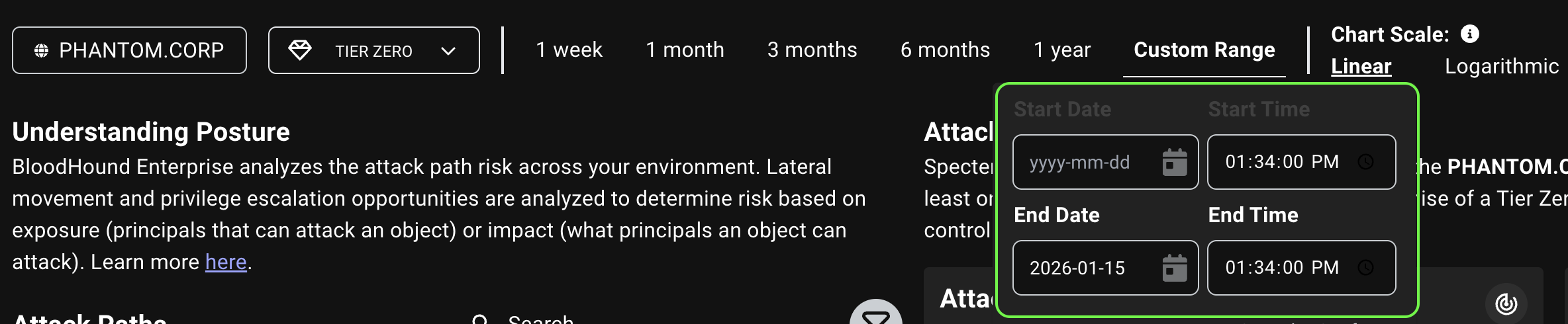
Customize time values in posture date range filters.
The custom date range filter on the [Posture](/analyze-data/findings/posture) page now includes a time picker that allows you to specify the exact time when filtering attack paths by date range.
This resolves an issue where the preset date range options used different times of day than the custom date range, which caused inconsistencies in attack path visibility between preset and custom date ranges.
## OpenGraph Node Search
Find OpenGraph nodes faster with improved search functionality.
BloodHound now supports searching for OpenGraph nodes in the [Search](/analyze-data/explore/search) tab on the **Explore** page, making it easier to find nodes from all data sources. Search accepts name or object ID, and finds exact and partial matches.
## Custom Date Range Time Input
Customize time values in posture date range filters.
The custom date range filter on the [Posture](/analyze-data/findings/posture) page now includes a time picker that allows you to specify the exact time when filtering attack paths by date range.
This resolves an issue where the preset date range options used different times of day than the custom date range, which caused inconsistencies in attack path visibility between preset and custom date ranges.
 ## Privilege Zone Management (Renamed)
Build and manage privilege zones with the newly renamed **Zone Builder**.
The **Privilege Zone Management** page has been renamed **Zone Builder** to better reflect its purpose as a tool for [building and managing zones](/analyze-data/privilege-zones/overview) that represent different levels of privilege within your environment.
## Privilege Zone Management (Renamed)
Build and manage privilege zones with the newly renamed **Zone Builder**.
The **Privilege Zone Management** page has been renamed **Zone Builder** to better reflect its purpose as a tool for [building and managing zones](/analyze-data/privilege-zones/overview) that represent different levels of privilege within your environment.
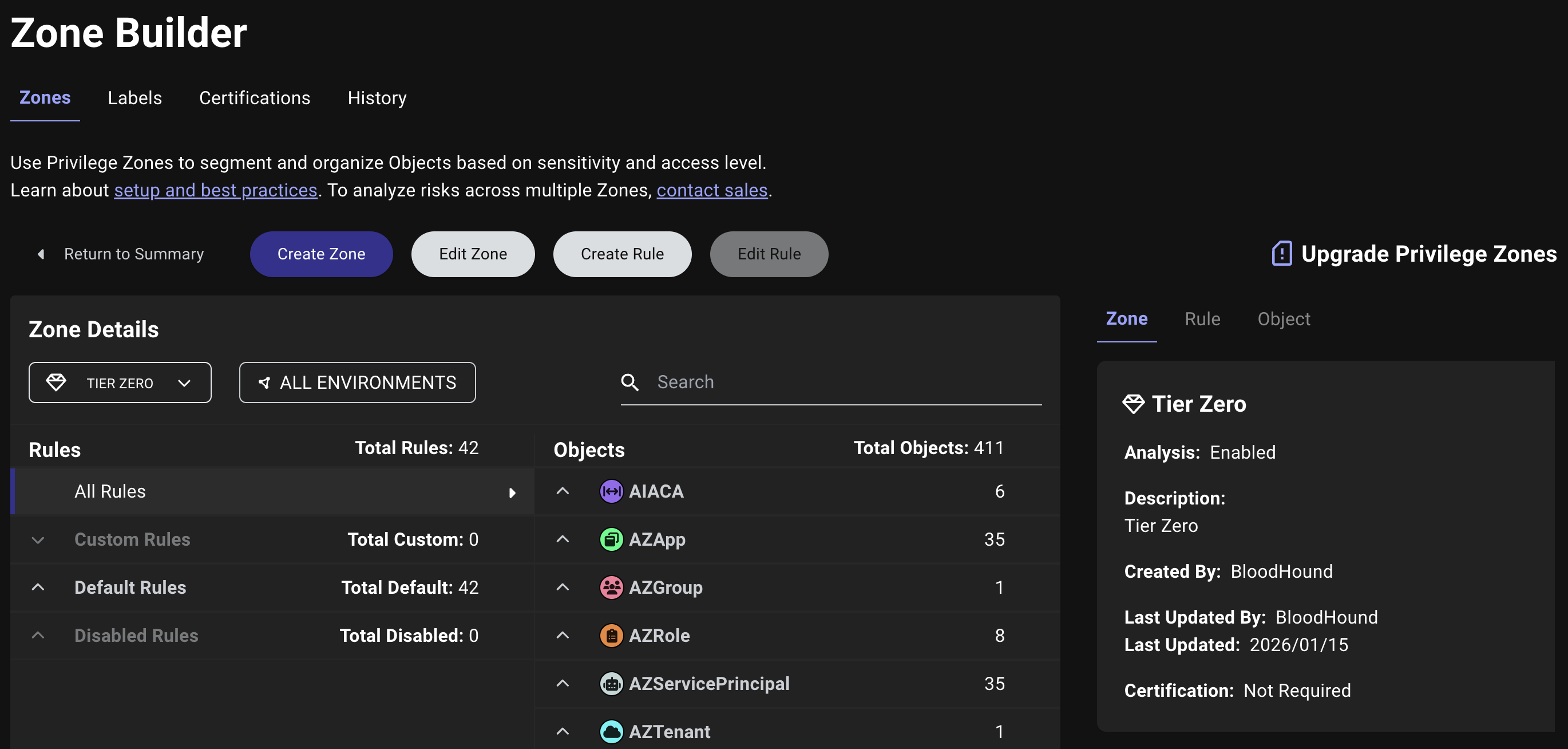 This enhancement includes several layout and navigation improvements, as well as updates to terminology. Keep reading for details!
### Zone and Label Dropdown Menus
The zone and label **Details View** now includes dropdown menus for navigating between different zones and labels, providing a more intuitive and efficient way to explore zone and label details.
#### Zones
This enhancement includes several layout and navigation improvements, as well as updates to terminology. Keep reading for details!
### Zone and Label Dropdown Menus
The zone and label **Details View** now includes dropdown menus for navigating between different zones and labels, providing a more intuitive and efficient way to explore zone and label details.
#### Zones
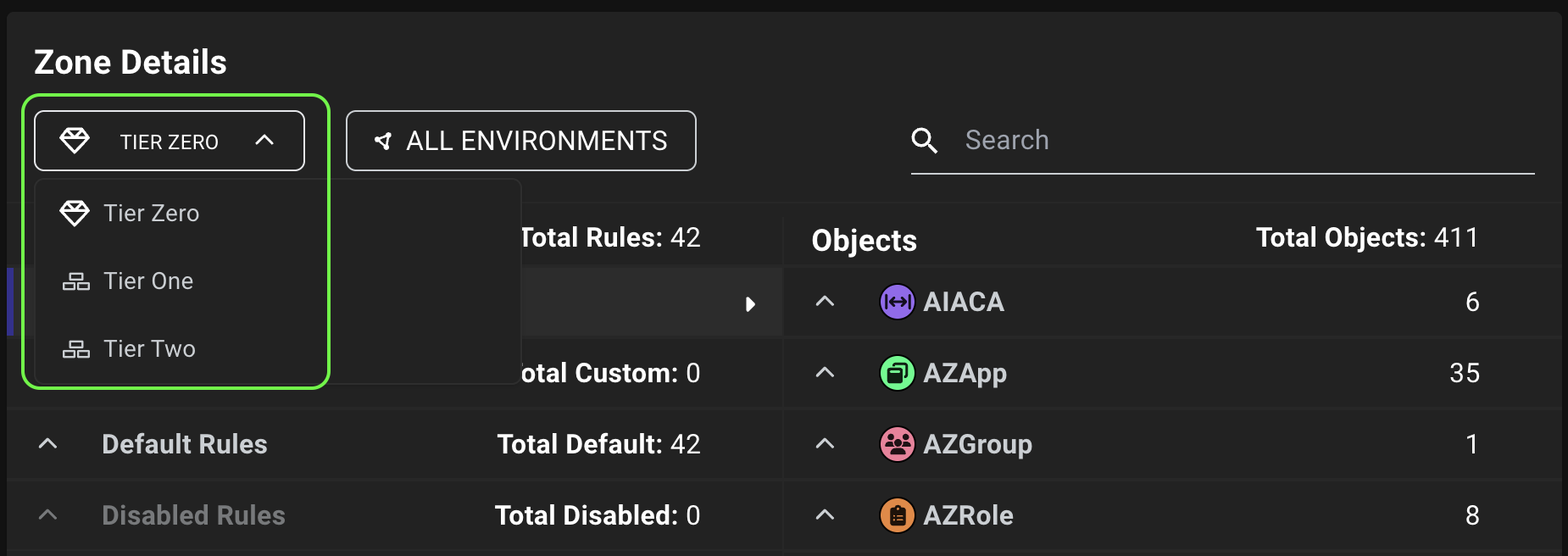
 The zone dropdown menu in the [Details View](/analyze-data/privilege-zones/zones#details-view) now uses consistent iconography to improve visual recognition and navigation.
The (gem) icon represents the default Tier Zero zone. A new zone icon represents all other zones (unless you've applied a custom glyph to the zone configuration).
The zone dropdown menu in the [Details View](/analyze-data/privilege-zones/zones#details-view) now uses consistent iconography to improve visual recognition and navigation.
The (gem) icon represents the default Tier Zero zone. A new zone icon represents all other zones (unless you've applied a custom glyph to the zone configuration).
 #### Labels
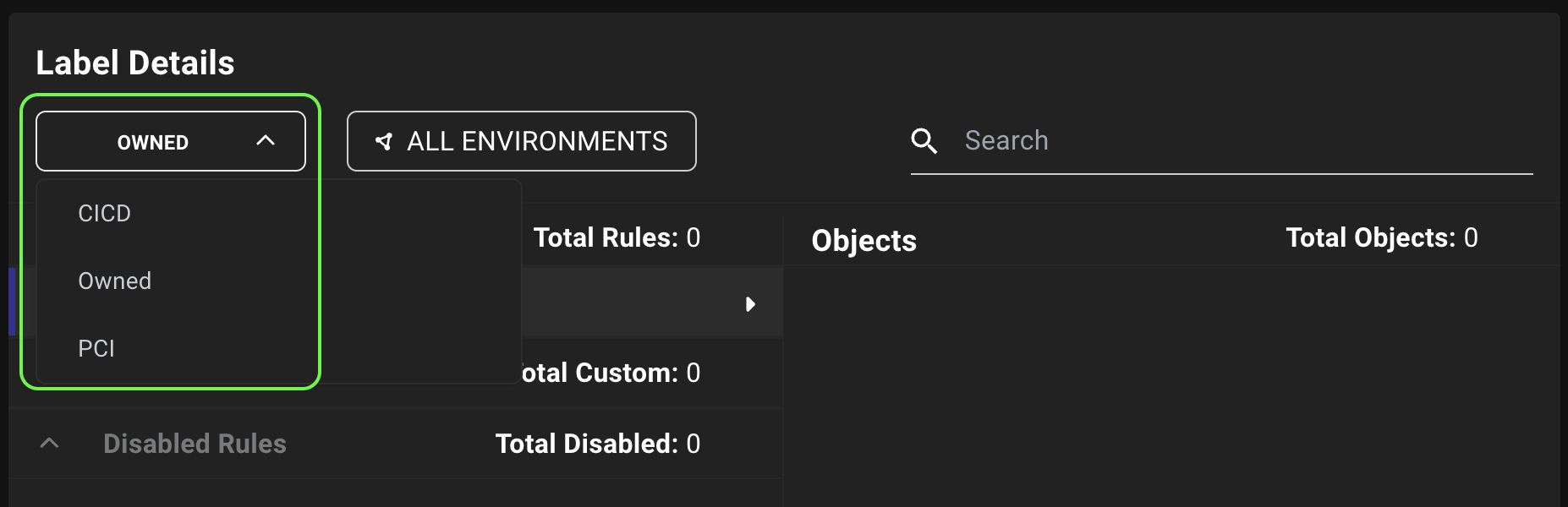
The label [Details View](/analyze-data/privilege-zones/labels#details-view) also includes a similar dropdown menu, but does not include icons.
#### Labels
The label [Details View](/analyze-data/privilege-zones/labels#details-view) also includes a similar dropdown menu, but does not include icons.
 ### Rules
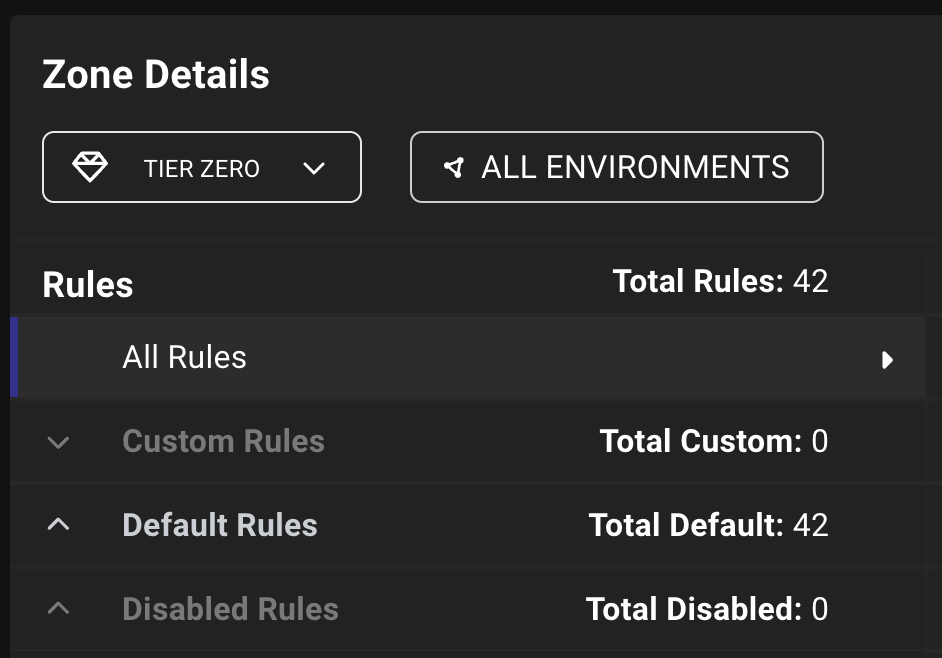
Navigating the zone and label **Details View** is now more intuitive with categories that group rules based on function:
* **All Rules**: View all rules that apply to the zone or label
* **Custom Rules**: View rules that you have created
* **Default Rules** (zones only): View [default rules](/analyze-data/privilege-zones/default-rules) that come pre-configured with BloodHound
* **Disabled Rules**: View rules that are currently disabled, regardless of whether they are default or custom
To see objects for disabled rules, you must re-enable the rule.
### Rules
Navigating the zone and label **Details View** is now more intuitive with categories that group rules based on function:
* **All Rules**: View all rules that apply to the zone or label
* **Custom Rules**: View rules that you have created
* **Default Rules** (zones only): View [default rules](/analyze-data/privilege-zones/default-rules) that come pre-configured with BloodHound
* **Disabled Rules**: View rules that are currently disabled, regardless of whether they are default or custom
To see objects for disabled rules, you must re-enable the rule.
 ### Members (Renamed)
The **Zone Builder** (formerly *Privilege Zone Management*) page and tabs now use the term "objects" instead of "members" to refer to the objects that rules pull into zones and labels.
This change provides more accurate terminology because "members" can be misleading. Rules can tag both objects that directly match object IDs or Cypher queries *and* objects that BloodHound tags through [expansion](/analyze-data/privilege-zones/rules#rule-expansion).
The new term "objects" encompasses both directly matched and expanded objects, providing clearer communication about how rules function and the resulting tagged objects in zones and labels.
### Zone and Label Details
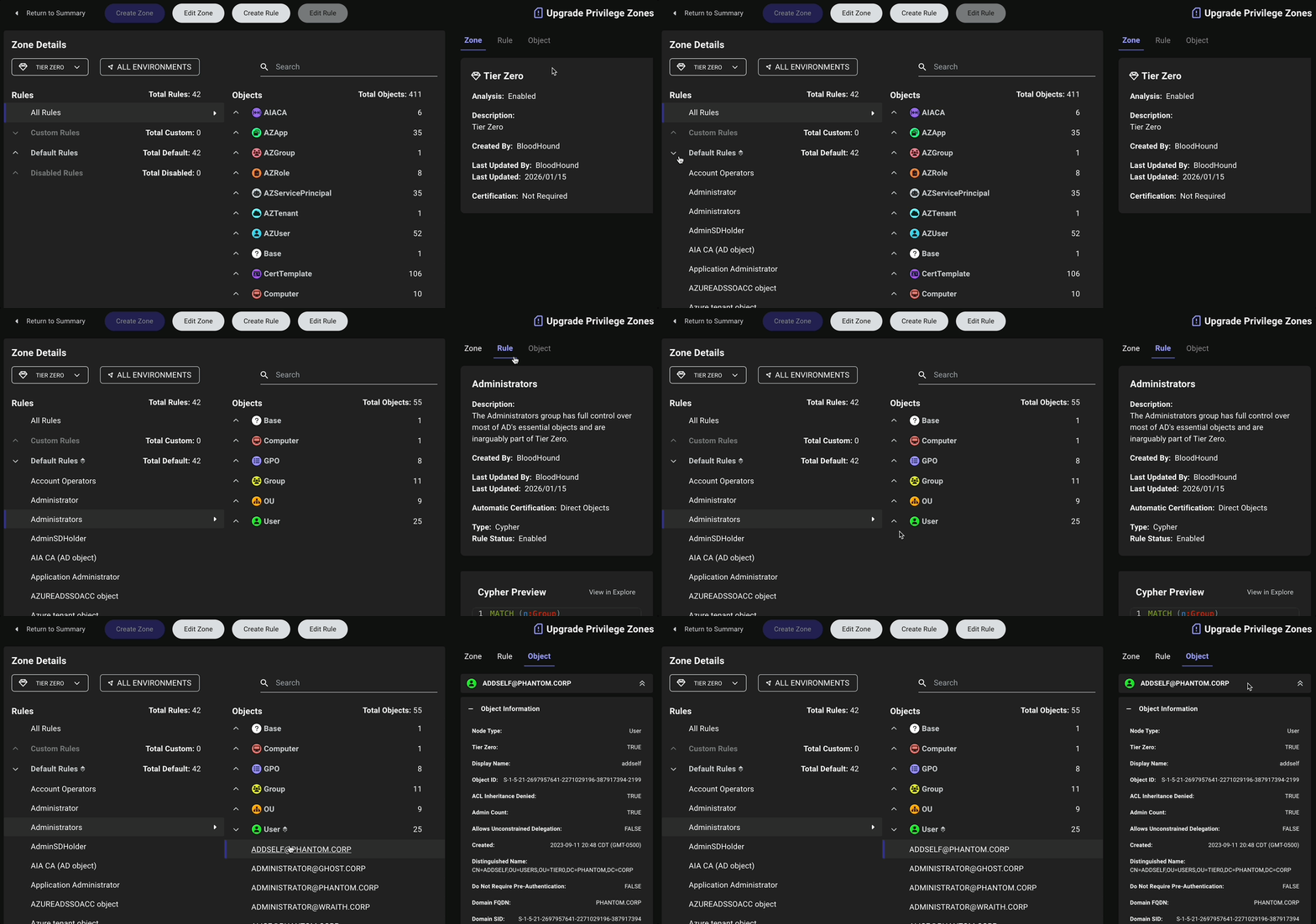
The zone and label **Details View** now displays details in the following tabs:
* **Zone**: Displayed by default when opening the zone [Details View](/analyze-data/privilege-zones/zones#details-view). This tab includes name, description, update history, and status.
* **Label**: Displayed by default when opening the label [Details View](/analyze-data/privilege-zones/labels#details-view). This tab includes name, description, and update history.
* **Rule**: Displayed after selecting a rule. This tab includes name, description, update history, certification state (for zones), type, status, and Cypher query (if applicable).
* **Object**: Displayed after selecting an object. This tab shows the **Entity** panel containing object properties and relationships.
### Members (Renamed)
The **Zone Builder** (formerly *Privilege Zone Management*) page and tabs now use the term "objects" instead of "members" to refer to the objects that rules pull into zones and labels.
This change provides more accurate terminology because "members" can be misleading. Rules can tag both objects that directly match object IDs or Cypher queries *and* objects that BloodHound tags through [expansion](/analyze-data/privilege-zones/rules#rule-expansion).
The new term "objects" encompasses both directly matched and expanded objects, providing clearer communication about how rules function and the resulting tagged objects in zones and labels.
### Zone and Label Details
The zone and label **Details View** now displays details in the following tabs:
* **Zone**: Displayed by default when opening the zone [Details View](/analyze-data/privilege-zones/zones#details-view). This tab includes name, description, update history, and status.
* **Label**: Displayed by default when opening the label [Details View](/analyze-data/privilege-zones/labels#details-view). This tab includes name, description, and update history.
* **Rule**: Displayed after selecting a rule. This tab includes name, description, update history, certification state (for zones), type, status, and Cypher query (if applicable).
* **Object**: Displayed after selecting an object. This tab shows the **Entity** panel containing object properties and relationships.
 ## Rules Form
Create and edit rules with enhanced form features and clearer insights.
The form for creating and editing rules in the Zone Builder now includes several enhancements to improve usability and provide clearer insights into rule configuration and results.
### Rule Status
This is a minor enhancement, but one that provides a concise call-to-action for users [managing rules](/analyze-data/privilege-zones/rules#edit-or-delete-a-rule).
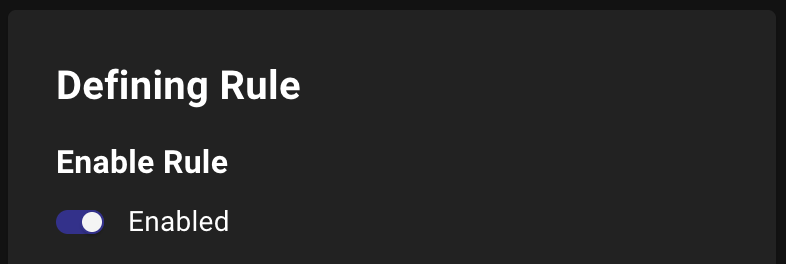
When enabling or disabling rules, you'll now see **Enable Rule** instead of **Rule Status** with the status on the same line as the toggle.
## Rules Form
Create and edit rules with enhanced form features and clearer insights.
The form for creating and editing rules in the Zone Builder now includes several enhancements to improve usability and provide clearer insights into rule configuration and results.
### Rule Status
This is a minor enhancement, but one that provides a concise call-to-action for users [managing rules](/analyze-data/privilege-zones/rules#edit-or-delete-a-rule).
When enabling or disabling rules, you'll now see **Enable Rule** instead of **Rule Status** with the status on the same line as the toggle.
 ### Direct and Expanded Objects in Sample Results
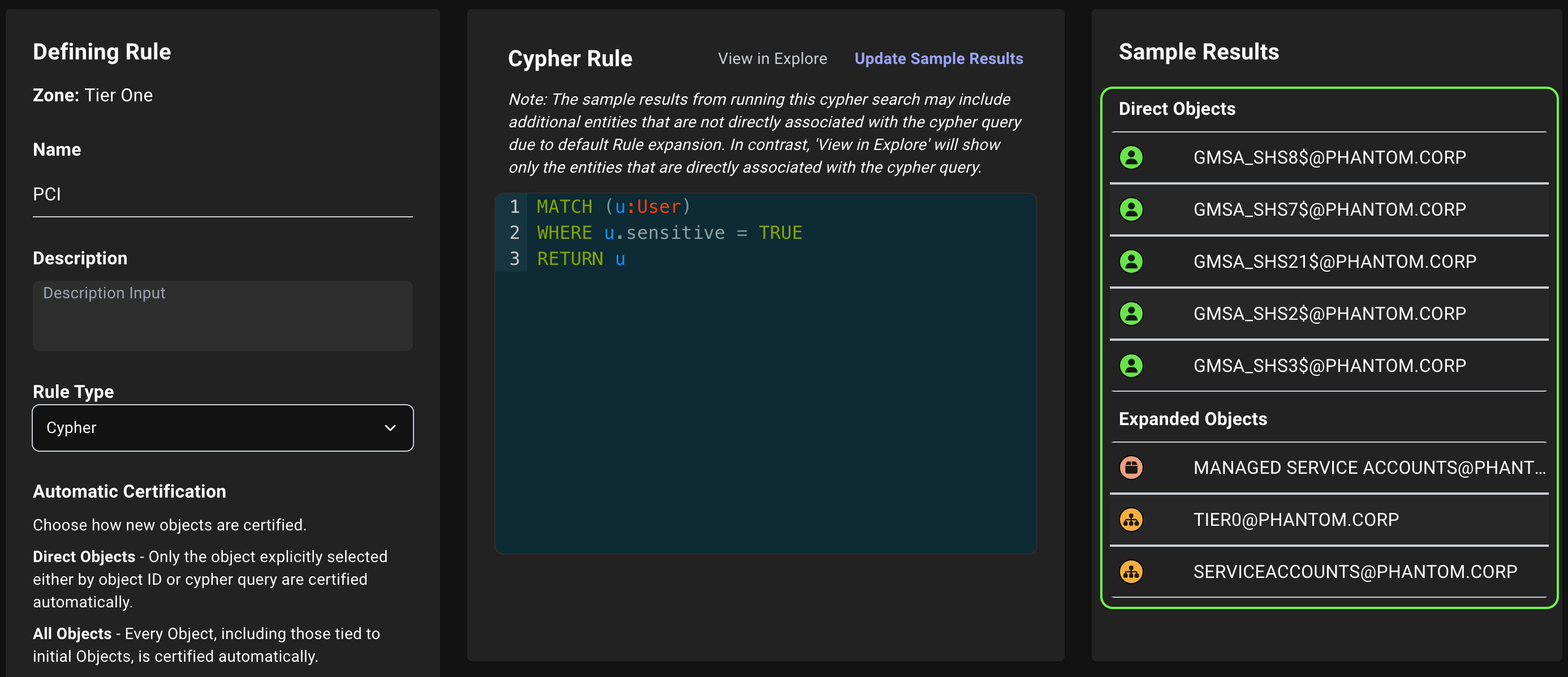
BloodHound now separates direct matches (objects that directly match the rule criteria) from expanded matches (objects that are connected to direct matches based on [expansion](/analyze-data/privilege-zones/rules#rule-expansion)) in the **Sample Results** panel when defining rules.
This enhancement provides clearer insights into how rules are applied and which objects are being tagged as a result.
### Direct and Expanded Objects in Sample Results
BloodHound now separates direct matches (objects that directly match the rule criteria) from expanded matches (objects that are connected to direct matches based on [expansion](/analyze-data/privilege-zones/rules#rule-expansion)) in the **Sample Results** panel when defining rules.
This enhancement provides clearer insights into how rules are applied and which objects are being tagged as a result.
 ### Improved In-Product Guidance for Creating Rules
BloodHound now provides improved messaging when you [define Cypher-based rules](/analyze-data/privilege-zones/rules#cypher) for zones and labels. If you try to save a Cypher-based rule without first clicking **Update Sample Results**, you'll see a prompt to do so before allowing you to save the rule.
### Improved In-Product Guidance for Creating Rules
BloodHound now provides improved messaging when you [define Cypher-based rules](/analyze-data/privilege-zones/rules#cypher) for zones and labels. If you try to save a Cypher-based rule without first clicking **Update Sample Results**, you'll see a prompt to do so before allowing you to save the rule.
 ## Zone and Label Forms
Manage zones and labels with an improved form layout and clearer messaging.
BloodHound now provides improved layout and messaging for managing zones and labels, including the following updates:
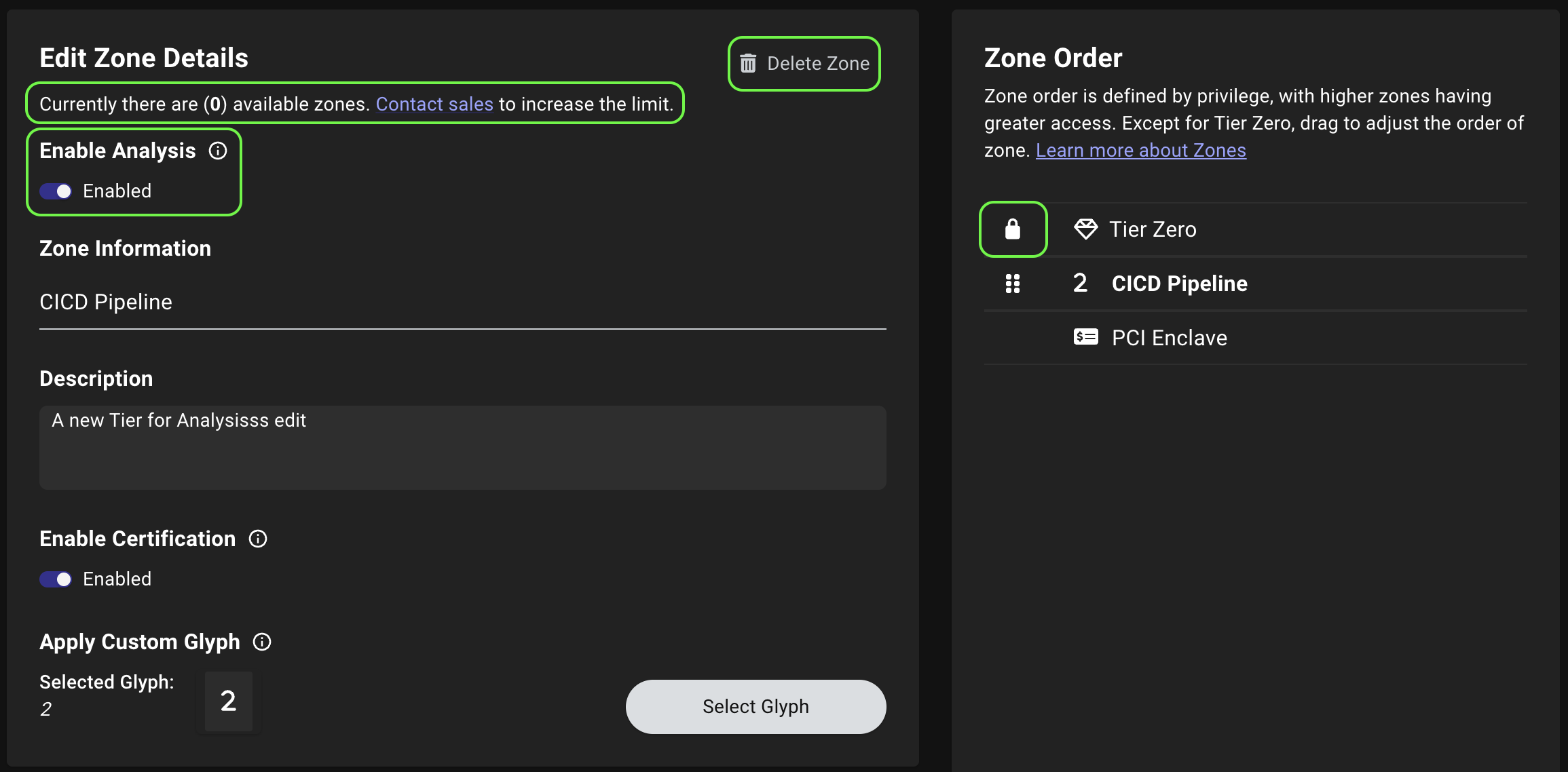
* The **Delete Zone** button has been moved to the top of the form.
* A new message at the top of the form specifies the remaining number of zones or labels that you can create and a link to contact sales to increase the limit.
* A (lock) icon now appears next to the Tier Zero zone in the **Zone Order** panel to indicate its protected status.
For zones specifically, the form now also includes the following updates:
* The **Enable Analysis** option has been moved to the top of the form for better visibility.
* The **Require Certification** option has been renamed to **Enable Certification** for consistency across other forms.
## Zone and Label Forms
Manage zones and labels with an improved form layout and clearer messaging.
BloodHound now provides improved layout and messaging for managing zones and labels, including the following updates:
* The **Delete Zone** button has been moved to the top of the form.
* A new message at the top of the form specifies the remaining number of zones or labels that you can create and a link to contact sales to increase the limit.
* A (lock) icon now appears next to the Tier Zero zone in the **Zone Order** panel to indicate its protected status.
For zones specifically, the form now also includes the following updates:
* The **Enable Analysis** option has been moved to the top of the form for better visibility.
* The **Require Certification** option has been renamed to **Enable Certification** for consistency across other forms.
 ## AzureHound Configuration
Azure Germany region support has been removed from AzureHound due to Microsoft's deprecation. When [configuring](/install-data-collector/install-azurehound/create-configuration) AzureHound for data collection, select from the remaining supported Azure regions.
## Certificate Abuse Data Collection Status
Track certificate abuse data collection progress with enhanced computer status logging.
SharpHound now writes computer status events to the `compstatus` log when collecting Certificate Authority Registry (`CARegistry`) data, providing better visibility into collection progress and helping troubleshoot data collection issues.
## Administration
* {/*BED-7170*/} Resolved an issue where the application would crash after refreshing the browser.
* {/*BED-7093*/} Resolved an issue where completed file upload tasks failed to update in the UI.
## Attack Path Analysis
{/*BED-5719*/} Resolved an issue causing inconsistent attack path visibility. Previously, the preset *date* range options on the **Posture** page used different *times of day* than the **Custom Range** option. A new [time picker](#bloodhound-8) is now available for custom date ranges to resolve this inconsistency.
## Explore
{/*BED-6940*/} Resolved an issue where the search option at the bottom of the **Explore** page on the **Pathfinding** or **Cypher** tabs displayed "unknown" edges in suggested results. Suggested results now return nodes only.
## OpenGraph
{/*BED-6589*/} Resolved an issue where OpenGraph file ingestion reported *All files failed to ingest as JSON Content* when files contained unresolved relationships. The [file upload API](/reference/collection-uploads/upload-file-to-job) now properly handles partial failures.
## Zone Builder
* {/*BED-7084*/} Resolved an issue where creating a large number of rules could exceed database connection limits, fail silently, and prevent tagging objects as expected.
* {/*BED-7083*/} Resolved an issue where object [expansion](/analyze-data/privilege-zones/rules#rule-expansion) in rules fails silently and prevents tagging members as expected.
* {/*BED-6874*/} Resolved an issue where the **Total Count** (renamed to **Total Objects** this release) on the zone and label **Details View** displayed inaccurate object totals when filtering between domains.
* {/*BED-6458*/} Resolved an issue where the **Tier Zero Exposure** value in the domain filter on the **Attack Paths** and **Posture** pages displayed the same percentage across all zones, preventing an accurate assessment of exposure metrics for individual zones.
* {/*BED-6931*/} Resolved an issue on the **Certifications** page where clicking **Certify** or **Revoke** without first selecting an object displayed the **Add Note** modal. The buttons are now deactivated until you select an object.
* {/*BED-7150*/} Resolved an issue where analysis failed on Cypher-based rules. Rules now properly ignore edges and select nodes only.
## Verbose Logging Performance
{/*BED-4602*/} Resolved an issue where AzureHound's [verbose logging mode](/collect-data/ce-collection/azurehound-flags#additional-scoping-and-output-flags) generated excessively large trace log files by dumping entire objects. Verbose logs now include only key details (ID and name), significantly reducing log file size while maintaining diagnostic value.
## AzureHound Configuration
Azure Germany region support has been removed from AzureHound due to Microsoft's deprecation. When [configuring](/install-data-collector/install-azurehound/create-configuration) AzureHound for data collection, select from the remaining supported Azure regions.
## Certificate Abuse Data Collection Status
Track certificate abuse data collection progress with enhanced computer status logging.
SharpHound now writes computer status events to the `compstatus` log when collecting Certificate Authority Registry (`CARegistry`) data, providing better visibility into collection progress and helping troubleshoot data collection issues.
## Administration
* {/*BED-7170*/} Resolved an issue where the application would crash after refreshing the browser.
* {/*BED-7093*/} Resolved an issue where completed file upload tasks failed to update in the UI.
## Attack Path Analysis
{/*BED-5719*/} Resolved an issue causing inconsistent attack path visibility. Previously, the preset *date* range options on the **Posture** page used different *times of day* than the **Custom Range** option. A new [time picker](#bloodhound-8) is now available for custom date ranges to resolve this inconsistency.
## Explore
{/*BED-6940*/} Resolved an issue where the search option at the bottom of the **Explore** page on the **Pathfinding** or **Cypher** tabs displayed "unknown" edges in suggested results. Suggested results now return nodes only.
## OpenGraph
{/*BED-6589*/} Resolved an issue where OpenGraph file ingestion reported *All files failed to ingest as JSON Content* when files contained unresolved relationships. The [file upload API](/reference/collection-uploads/upload-file-to-job) now properly handles partial failures.
## Zone Builder
* {/*BED-7084*/} Resolved an issue where creating a large number of rules could exceed database connection limits, fail silently, and prevent tagging objects as expected.
* {/*BED-7083*/} Resolved an issue where object [expansion](/analyze-data/privilege-zones/rules#rule-expansion) in rules fails silently and prevents tagging members as expected.
* {/*BED-6874*/} Resolved an issue where the **Total Count** (renamed to **Total Objects** this release) on the zone and label **Details View** displayed inaccurate object totals when filtering between domains.
* {/*BED-6458*/} Resolved an issue where the **Tier Zero Exposure** value in the domain filter on the **Attack Paths** and **Posture** pages displayed the same percentage across all zones, preventing an accurate assessment of exposure metrics for individual zones.
* {/*BED-6931*/} Resolved an issue on the **Certifications** page where clicking **Certify** or **Revoke** without first selecting an object displayed the **Add Note** modal. The buttons are now deactivated until you select an object.
* {/*BED-7150*/} Resolved an issue where analysis failed on Cypher-based rules. Rules now properly ignore edges and select nodes only.
## Verbose Logging Performance
{/*BED-4602*/} Resolved an issue where AzureHound's [verbose logging mode](/collect-data/ce-collection/azurehound-flags#additional-scoping-and-output-flags) generated excessively large trace log files by dumping entire objects. Verbose logs now include only key details (ID and name), significantly reducing log file size while maintaining diagnostic value.