> ## Documentation Index
> Fetch the complete documentation index at: https://bloodhound.specterops.io/llms.txt
> Use this file to discover all available pages before exploring further.
# About BloodHound Edges
> Edges are part of the graph construct and are represented as links/relationships that connect one node to another node.
 For example, the image below shows three User nodes (left side) connected to one Group node (right side), via the “MemberOf” edge, indicating the three users belong to the group:
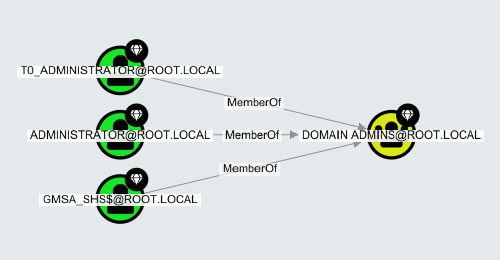 The direction of the edge, indicated by the arrow, always indicates the direction of attack or privilege. From the above example, because all three users have a "MemberOf" edge pointing towards the group, all three users have the same privileges as the group.
Clicking on an Edge's name/label in the graph shows its properties in the Entity Panel:
The direction of the edge, indicated by the arrow, always indicates the direction of attack or privilege. From the above example, because all three users have a "MemberOf" edge pointing towards the group, all three users have the same privileges as the group.
Clicking on an Edge's name/label in the graph shows its properties in the Entity Panel:
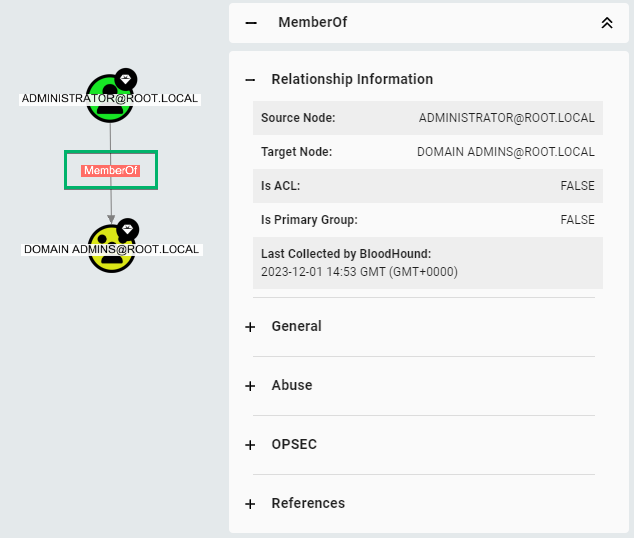 Edges have only a few properties, which always include the following:
* Source Node
* Target Node
* Last Seen by BloodHound
Each article in this section documents an individual edge, and each contains:
* A description of the edge.
* **Abuse Info:** How red teamers can use the privilege of the edge to obtain their goals.
* **Opsec Considerations:** What red teamers should consider avoiding detection and thereby increasing **op**erational **sec**urity.
* **Edge Schema:** Lists valid edge sources and destinations (targets) and specifies whether the edge is traversable.
* **References:** Links to publicly available sources used to create the above information.
Note that edge names indicate what directory they apply to; all Azure and Entra ID edges are prefixed with "AZ", while Active Directory edges have no prefix.
Edges have only a few properties, which always include the following:
* Source Node
* Target Node
* Last Seen by BloodHound
Each article in this section documents an individual edge, and each contains:
* A description of the edge.
* **Abuse Info:** How red teamers can use the privilege of the edge to obtain their goals.
* **Opsec Considerations:** What red teamers should consider avoiding detection and thereby increasing **op**erational **sec**urity.
* **Edge Schema:** Lists valid edge sources and destinations (targets) and specifies whether the edge is traversable.
* **References:** Links to publicly available sources used to create the above information.
Note that edge names indicate what directory they apply to; all Azure and Entra ID edges are prefixed with "AZ", while Active Directory edges have no prefix.