> ## Documentation Index
> Fetch the complete documentation index at: https://bloodhound.specterops.io/llms.txt
> Use this file to discover all available pages before exploring further.
# Okta App Registration
> Create an API service application in Okta to authenticate the OpenHound Okta collector.
 The OpenHound Okta collector authenticates to the Okta API using an OAuth 2.0 service application with a public/private key pair.
To create the Okta application registration for the OpenHound Okta collector, follow the steps below.
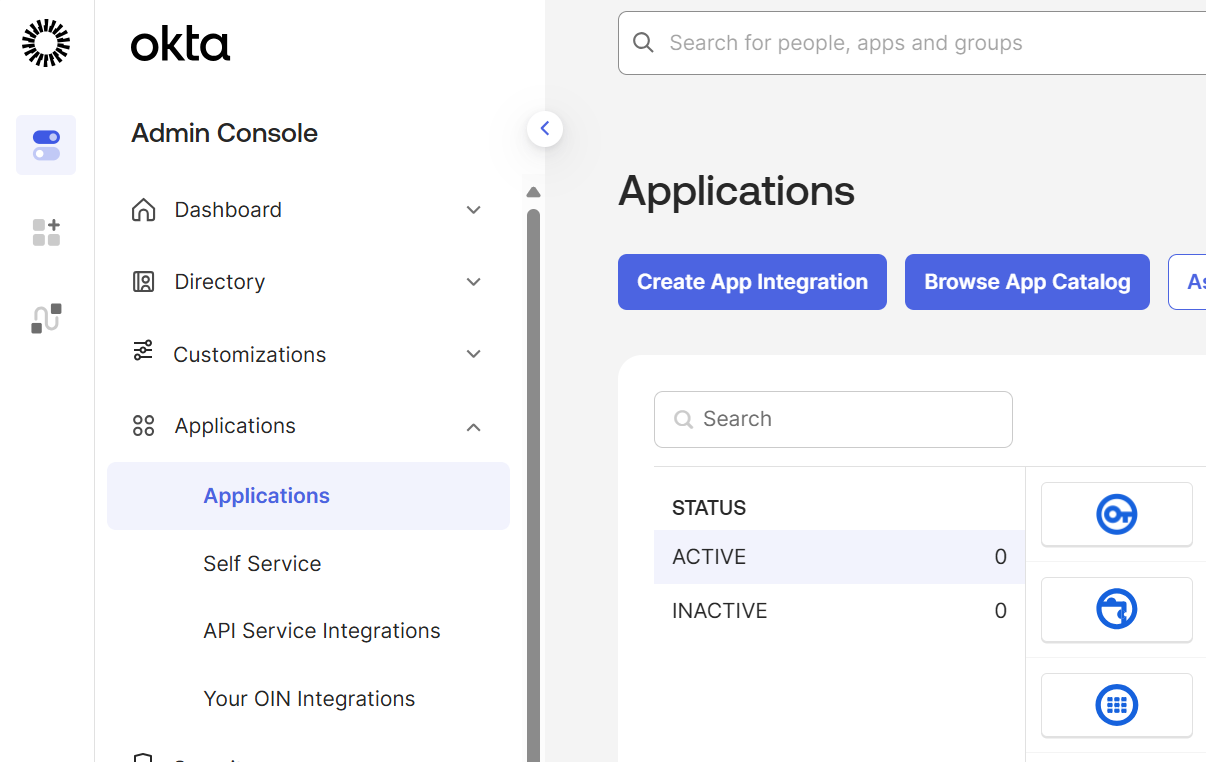
In the Okta Admin Console, navigate to **Applications > Applications** and click **Create App Integration**.
The OpenHound Okta collector authenticates to the Okta API using an OAuth 2.0 service application with a public/private key pair.
To create the Okta application registration for the OpenHound Okta collector, follow the steps below.
In the Okta Admin Console, navigate to **Applications > Applications** and click **Create App Integration**.
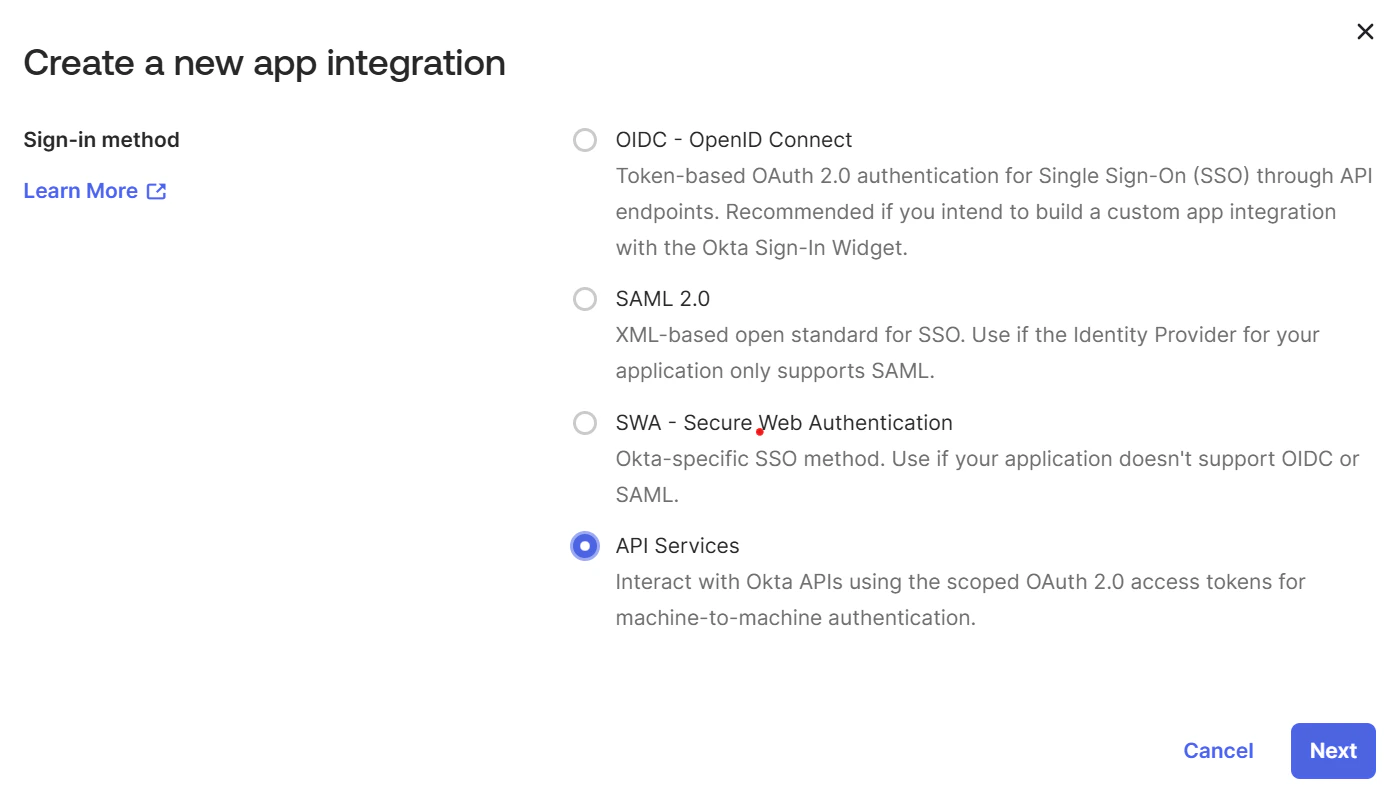
 In the **Create a new app integration** dialog, select **API Services** and click **Next**.
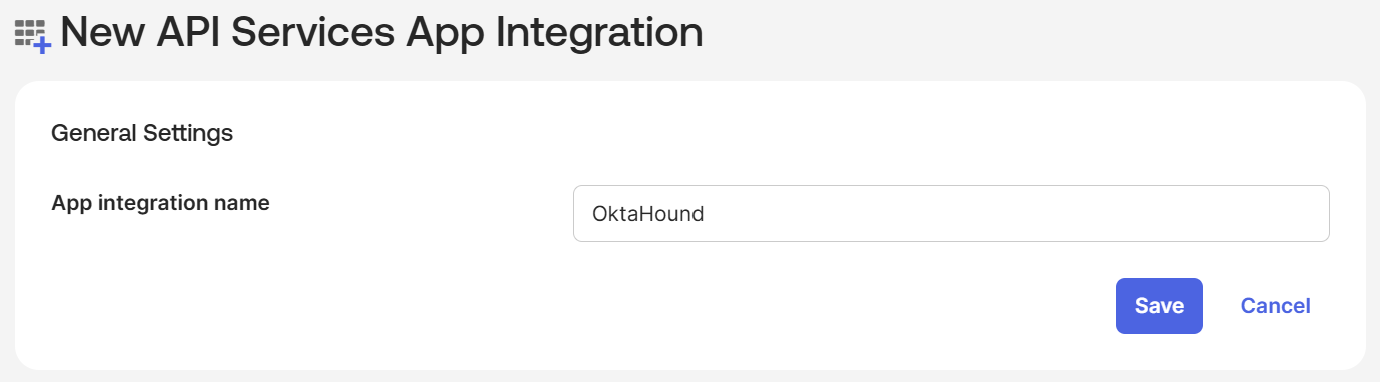
 Enter a name for the app integration and click **Save**.
 After the application is created, you are taken to the **General** tab. Make a note of the newly created application's Client ID for the collector.
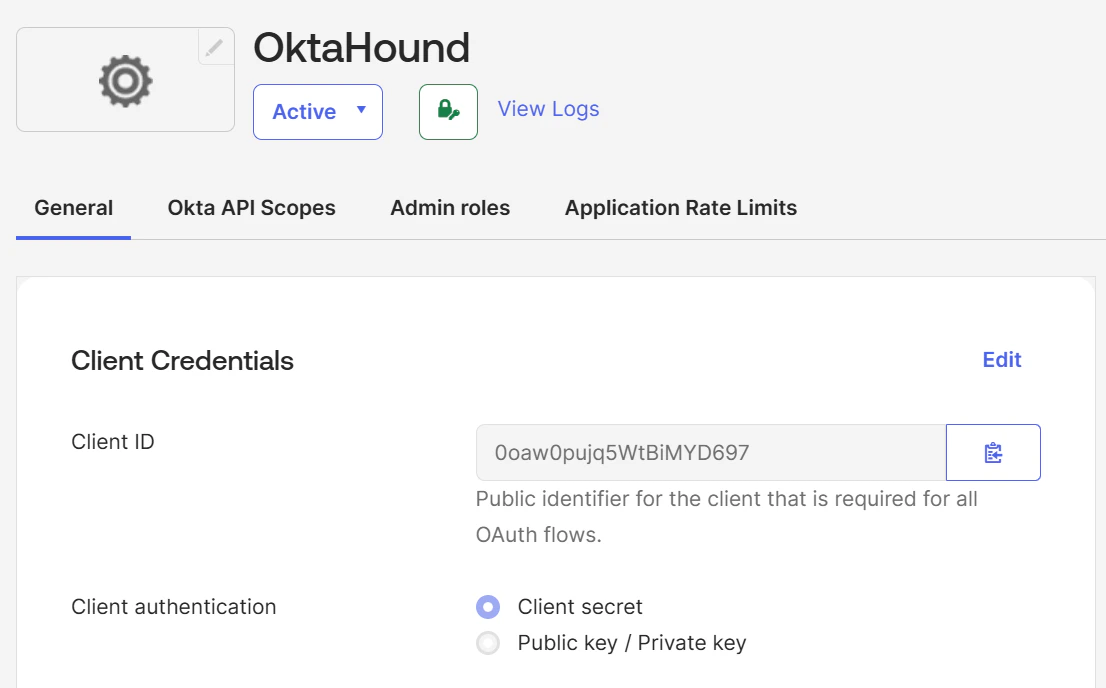 Under **Client Credentials**, click **Edit** and change **Client authentication** from **Client secret** to **Public key / Private key**.
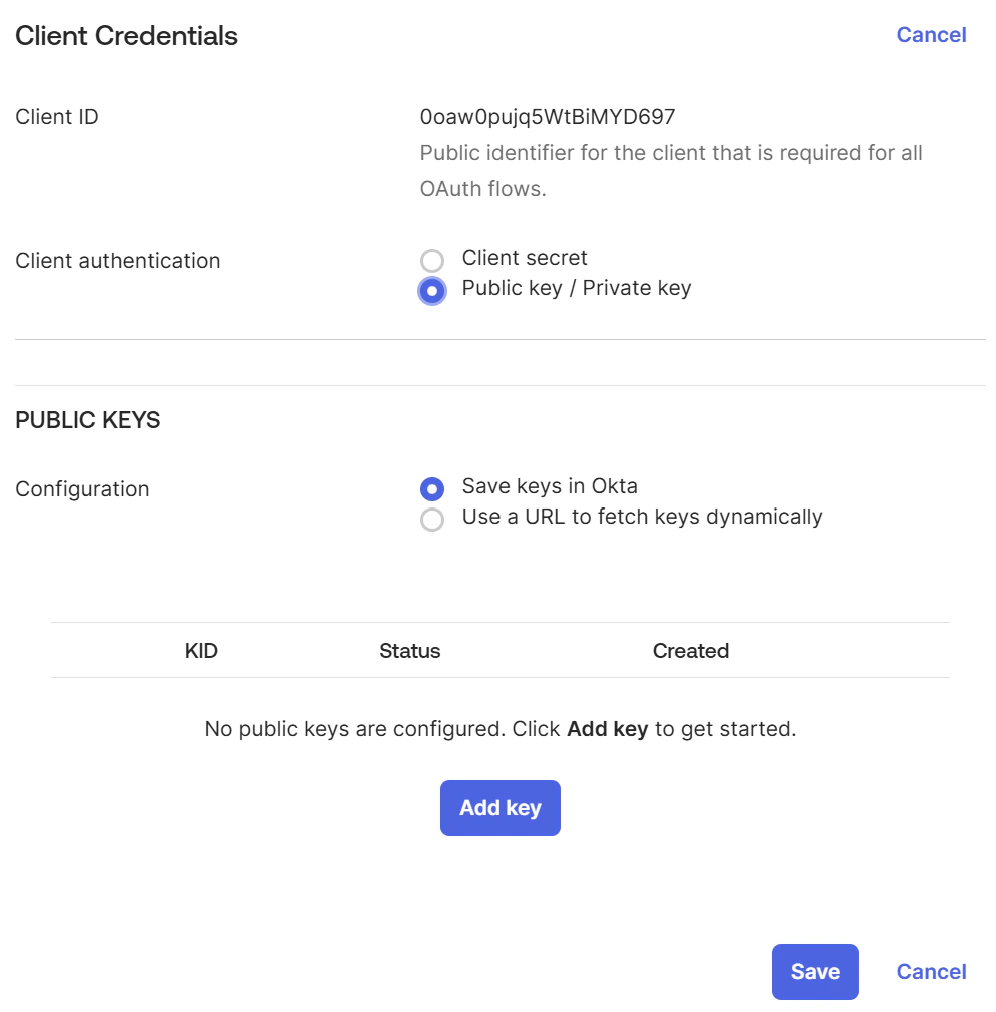 Under **PUBLIC KEYS**, click **Add key**, then click **Generate new key**.
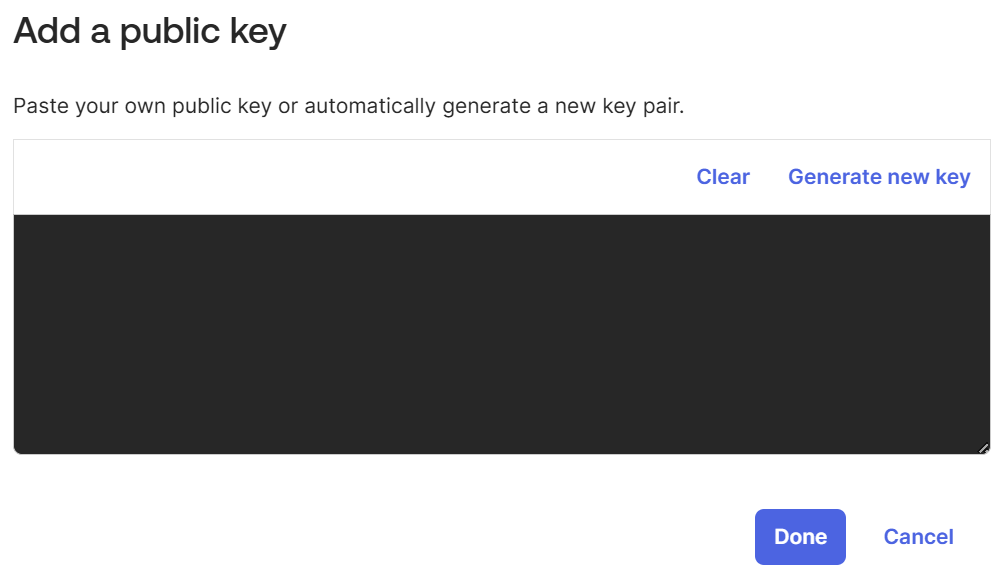
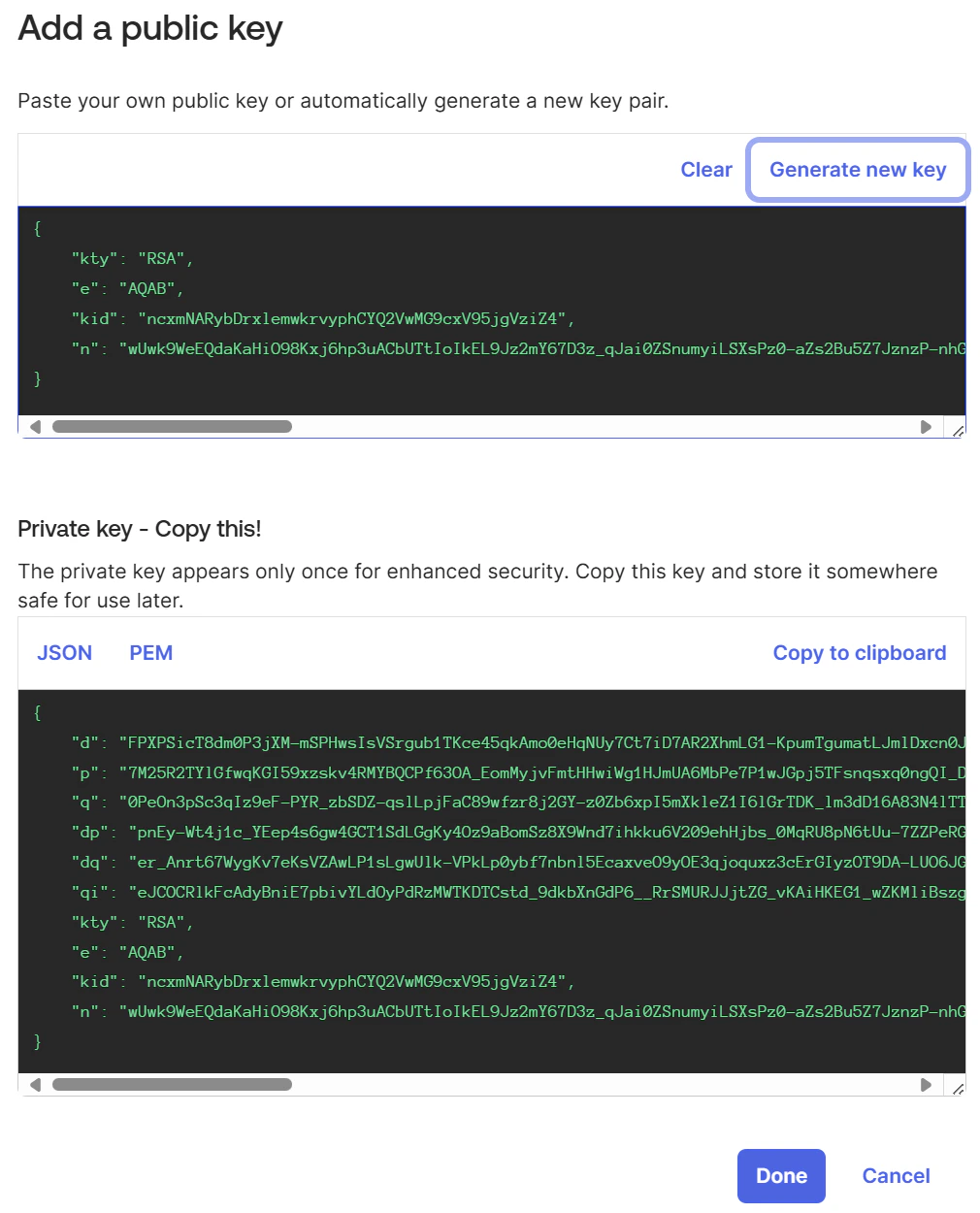 Copy the private key (JSON) and store it securely — it is only displayed once.
Click **Done** to close the key dialog.
Verify the key appears in the **PUBLIC KEYS** table, then click **Save**.
Copy the private key (JSON) and store it securely — it is only displayed once.
Click **Done** to close the key dialog.
Verify the key appears in the **PUBLIC KEYS** table, then click **Save**.
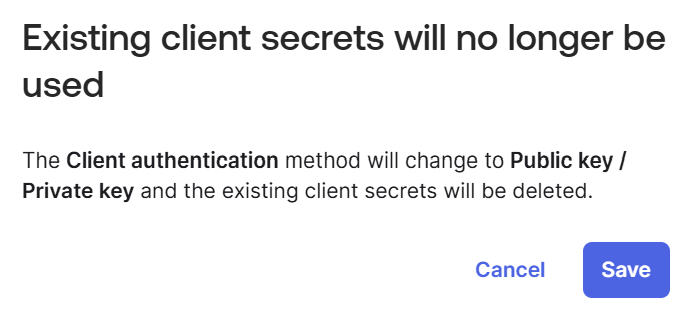
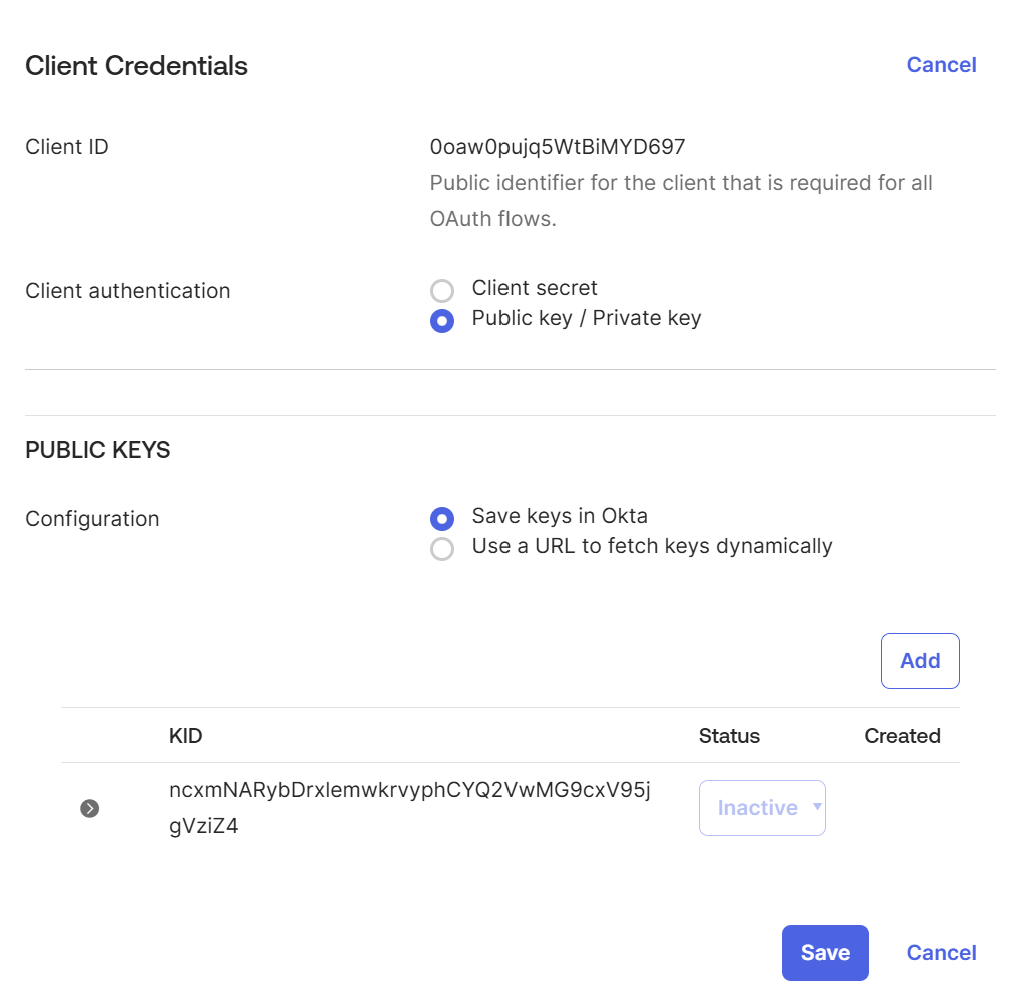 Confirm the prompt that existing client secrets will no longer be used.
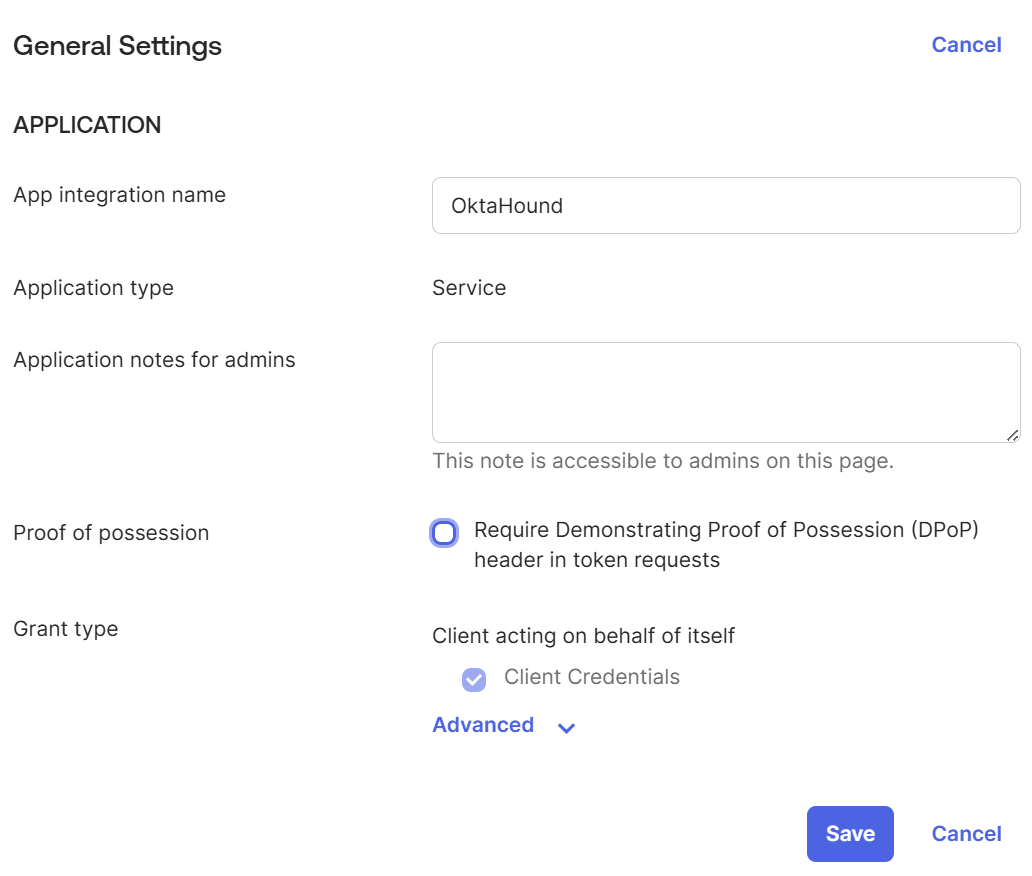
 Uncheck the **Require Demonstrating of Proof of Possession (DPoP)** option and click **Save**.
 Navigate to the **Okta API Scopes** tab and grant the scopes required by the OpenHound Okta collector.
The Okta application registration used by the OpenHound Okta collector requires the following [OAuth 2.0 scopes](https://developer.okta.com/docs/api/oauth2/) for data collection to function correctly:
| OAuth 2.0 Scope | Description |
| ---------------------------------------------------------------------------------------------------------------------- | -------------------------------------------------------------------------------------------- |
| `okta.agentPools.read` | Allows the app to read agent pools in your Okta organization. |
| `okta.apiTokens.read` | Allows the app to read API tokens in your Okta organization. |
| `okta.appGrants.read` | Allows the app to read grants in your Okta organization. |
| [okta.apps.read](https://developer.okta.com/docs/api/openapi/okta-management/guides/permissions/#oktaappsread) | Allows the app to read information about Apps in your Okta organization. |
| `okta.authenticators.read` | Allows the app to read authenticators in your Okta organization. |
| `okta.authorizationServers.read` | Allows the app to read information about authorization servers in your Okta organization. |
| `okta.clients.read` | Allows the app to read OAuth 2.0 clients in your Okta organization. |
| [okta.devices.read](https://developer.okta.com/docs/api/openapi/okta-management/guides/permissions/#oktadevicesread) | Allows the app to read the existing device's profile and search devices. |
| `okta.features.read` | Allows the app to read information about features in your Okta organization. |
| [okta.groups.read](https://developer.okta.com/docs/api/openapi/okta-management/guides/permissions/#oktagroupsread) | Allows the app to read information about groups and their members in your Okta organization. |
| `okta.idps.read` | Allows the app to read information about identity providers in your Okta organization. |
| `okta.oauthIntegrations.read` | Allows the app to read API service integration instances in your Okta organization. |
| `okta.orgs.read` | Allows the app to read organization-specific details about your Okta organization. |
| [okta.policies.read](https://developer.okta.com/docs/api/openapi/okta-management/guides/permissions/#oktapoliciesread) | Allows the app to read information about policies in your Okta organization. |
| `okta.realmAssignments.read` | Allows the app to read realm assignments in your Okta organization. |
| [okta.realms.read](https://developer.okta.com/docs/api/openapi/okta-management/guides/permissions/#oktarealmsread) | Allows the app to read the existing realms and their details. |
| `okta.roles.read` | Allows the app to read administrative role assignments for users in your Okta organization. |
| [okta.users.read](https://developer.okta.com/docs/api/openapi/okta-management/guides/permissions/#oktausersread) | Allows the app to read the existing users' profiles and credentials. |
The [`okta.realms.read`](https://developer.okta.com/docs/api/openapi/okta-management/management/tag/Realm) and [`okta.realmAssignments.read`](https://developer.okta.com/docs/api/openapi/okta-management/management/tag/RealmAssignment) scopes are optional and requires Okta Identity Governance or Secure Partner Access.
Navigate to the **Admin roles** tab and assign the [**Super Administrator**](https://help.okta.com/en-us/content/topics/security/administrators-super-admin.htm) role.
Less privileged Okta roles currently cannot be used to read role assignments and OAuth 2.0 grants.
Due to the OAuth 2.0 scopes defined above, the OpenHound Okta collector will not be able to modify any data in the Okta organization.
Navigate to the **Okta API Scopes** tab and grant the scopes required by the OpenHound Okta collector.
The Okta application registration used by the OpenHound Okta collector requires the following [OAuth 2.0 scopes](https://developer.okta.com/docs/api/oauth2/) for data collection to function correctly:
| OAuth 2.0 Scope | Description |
| ---------------------------------------------------------------------------------------------------------------------- | -------------------------------------------------------------------------------------------- |
| `okta.agentPools.read` | Allows the app to read agent pools in your Okta organization. |
| `okta.apiTokens.read` | Allows the app to read API tokens in your Okta organization. |
| `okta.appGrants.read` | Allows the app to read grants in your Okta organization. |
| [okta.apps.read](https://developer.okta.com/docs/api/openapi/okta-management/guides/permissions/#oktaappsread) | Allows the app to read information about Apps in your Okta organization. |
| `okta.authenticators.read` | Allows the app to read authenticators in your Okta organization. |
| `okta.authorizationServers.read` | Allows the app to read information about authorization servers in your Okta organization. |
| `okta.clients.read` | Allows the app to read OAuth 2.0 clients in your Okta organization. |
| [okta.devices.read](https://developer.okta.com/docs/api/openapi/okta-management/guides/permissions/#oktadevicesread) | Allows the app to read the existing device's profile and search devices. |
| `okta.features.read` | Allows the app to read information about features in your Okta organization. |
| [okta.groups.read](https://developer.okta.com/docs/api/openapi/okta-management/guides/permissions/#oktagroupsread) | Allows the app to read information about groups and their members in your Okta organization. |
| `okta.idps.read` | Allows the app to read information about identity providers in your Okta organization. |
| `okta.oauthIntegrations.read` | Allows the app to read API service integration instances in your Okta organization. |
| `okta.orgs.read` | Allows the app to read organization-specific details about your Okta organization. |
| [okta.policies.read](https://developer.okta.com/docs/api/openapi/okta-management/guides/permissions/#oktapoliciesread) | Allows the app to read information about policies in your Okta organization. |
| `okta.realmAssignments.read` | Allows the app to read realm assignments in your Okta organization. |
| [okta.realms.read](https://developer.okta.com/docs/api/openapi/okta-management/guides/permissions/#oktarealmsread) | Allows the app to read the existing realms and their details. |
| `okta.roles.read` | Allows the app to read administrative role assignments for users in your Okta organization. |
| [okta.users.read](https://developer.okta.com/docs/api/openapi/okta-management/guides/permissions/#oktausersread) | Allows the app to read the existing users' profiles and credentials. |
The [`okta.realms.read`](https://developer.okta.com/docs/api/openapi/okta-management/management/tag/Realm) and [`okta.realmAssignments.read`](https://developer.okta.com/docs/api/openapi/okta-management/management/tag/RealmAssignment) scopes are optional and requires Okta Identity Governance or Secure Partner Access.
Navigate to the **Admin roles** tab and assign the [**Super Administrator**](https://help.okta.com/en-us/content/topics/security/administrators-super-admin.htm) role.
Less privileged Okta roles currently cannot be used to read role assignments and OAuth 2.0 grants.
Due to the OAuth 2.0 scopes defined above, the OpenHound Okta collector will not be able to modify any data in the Okta organization.