> ## Documentation Index
> Fetch the complete documentation index at: https://bloodhound.specterops.io/llms.txt
> Use this file to discover all available pages before exploring further.
# Graph Data Overview
> Learn about the JSON structure and schema requirements for OpenGraph data payloads.
 An OpenGraph data payload is a JSON document generated by an OpenGraph collector and uploaded to BloodHound. It represents entities as nodes and relationships as edges so you can search, explore, and analyze your environment, including Attack Paths.
This page explains the structure and schema requirements for OpenGraph data payloads. It also provides a minimal viable payload example that you can use as a starting point for your own OpenGraph data.
## Before you begin
Full OpenGraph support requires a PostgreSQL graph database and one of the following editions:
* BloodHound Enterprise (uses PostgreSQL by default)
* BloodHound Community v8.0.0+ (requires changing to a [PostgreSQL database](/get-started/custom-installation#postgresql))
While many OpenGraph features may work on a Neo4j database, there are functional and performance limitations (see the [OpenGraph FAQ](/opengraph/faq#why-is-it-taking-so-long-to-ingest-opengraph-data)). For full support, migrate to a PostgreSQL database.
## File requirements
OpenGraph data payloads are accepted as `.json` files or `.zip` archives. A single upload operation can include a mix of valid `.json` and `.zip` files from different collectors (for example, SharpHound and OpenGraph). Additional constraints include:
* `.zip` archives can contain multiple `.json` payload files.
* Nested `.zip` archives are not supported.
* If you upload a `.zip` archive, every file in the archive must be a valid data payload.
## Data payload structure
All OpenGraph extensions must use the same data payload format. At minimum, a data payload must include the following top-level structure:
```json theme={null}
{
"graph": {
"nodes": [],
"edges": []
}
}
```
The `nodes` and `edges` arrays must conform to minimum JSON schemas. BloodHound validates that the JSON is well-formed and that nodes and edges meet these schema requirements, but it does not enforce additional structure or constraints beyond them.
For field-level details and schema requirements, see the following pages:
| Page | Description |
| ----------------------------------------- | -------------------------------------------------------------------------------------------------------- |
| [Metadata](/opengraph/developer/metadata) | Defines payload-wide ingest behavior to facilitate organizing and managing graph data by source. |
| [Nodes](/opengraph/developer/nodes) | Represents entities in your graph, such as users, devices, repositories, applications, and environments. |
| [Edges](/opengraph/developer/edges) | Represents relationships between nodes in your graph indicating some form of interaction or access. |
## Graph structure
To enforce additional structure beyond the minimum JSON schemas and enable advanced features in BloodHound, you can use an extension definition schema to define node and edge types, environments, and relationships.
When you upload a data payload that conforms to an installed extension definition schema, BloodHound produces a **structured graph** with enhanced features compared to a generic graph.
| Graph | Use this when |
| ------------------------------------------------------------------------------------------------------------------------------------------------------------------------------------------------------------- | ------------------------------------------------------------------------------------------------------------------------------- |
| Generic graph | You only need to ingest and [search](/analyze-data/explore/search#search) nodes and edges. |
| Structured graph | You need schema-driven [analysis](/analyze-data/findings/analysis) and [pathfinding](/analyze-data/explore/search#pathfinding). |
## Data source
OpenGraph extensions can collect data from many different systems. By default, BloodHound identifies this as *sourceless data*. If you're using multiple extensions, you may have multiple data sources feeding into your BloodHound graph database without any way to differentiate them.
To facilitate organizing and managing OpenGraph data in BloodHound, you can register a `source_kind` and apply it to the relevant nodes in your data payload. Once registered, BloodHound reuses it for subsequent uploads with the same node kinds, even if the data payload omits it.
For example, if you wanted to delete all data for a source, you could navigate to the **Administration** > **Database Management** page and select the name of the defined source.
You can still remove OpenGraph data without registering and applying a `source_kind` by checking the **Sourceless data** option. However, that could have unintended consequences if you have multiple OpenGraph data sources without a registered `source_kind`.
You can **register** a `source_kind` in two ways:
* Specify it in at least one payload's [`metadata`](/opengraph/developer/metadata) object. After that initial registration, later payloads can reuse it without re-registering it.
* Define it as an [`environments.source_kind`](/opengraph/developer/graph-definition#param-source-kind) value in an extension definition schema.
You can **apply** a `source_kind` in two ways:
* Specify it in the payload's [`metadata`](/opengraph/developer/metadata) object, which applies it to all defined nodes.
* Explicitly include it in a node's [`kinds`](/opengraph/developer/nodes#param-kinds) array, which applies it only to that node.
In structured graphs, nodes *must* include a registered `source_kind` to produce findings and metrics.
Specific [node properties](/opengraph/developer/nodes#findings-and-metrics) are also required to produce findings for structured graphs in BloodHound Enterprise.
The following points describe how `source_kind` influences metrics calculations:
* **Exposure metrics:** Traverse upstream toward the origin and stop when a node in the same zone is encountered (for Tier Zero paths, this means stopping when a Tier Zero node is reached). The origin node itself is not included.
* **Impact metrics:** Traverse downstream from the target node and include nodes in the same zone until the downstream set is fully enumerated.
## Minimal viable data payload
The following is a minimal example payload for a generic graph. You can use it as a starting point for your own OpenGraph data payload. Copy and paste the following example into a new `.json` file or download this example file.
When working with JSON files, use a plain text editor and UTF-8 encoding. Some
text editors may introduce unexpected, non-standard characters that can cause
parsing errors. It's always a good idea to validate your JSON with a
[linter](https://jsonlint.com/) before uploading it to BloodHound.
```json theme={null}
{
"graph": {
"nodes": [
{
"id": "123",
"kinds": ["Person"],
"properties": {
"displayname": "bob",
"name": "BOB"
}
},
{
"id": "234",
"kinds": ["Person"],
"properties": {
"displayname": "alice",
"name": "ALICE"
}
}
],
"edges": [
{
"kind": "Knows",
"start": {
"value": "123",
"match_by": "id"
},
"end": {
"value": "234",
"match_by": "id"
}
}
]
}
}
```
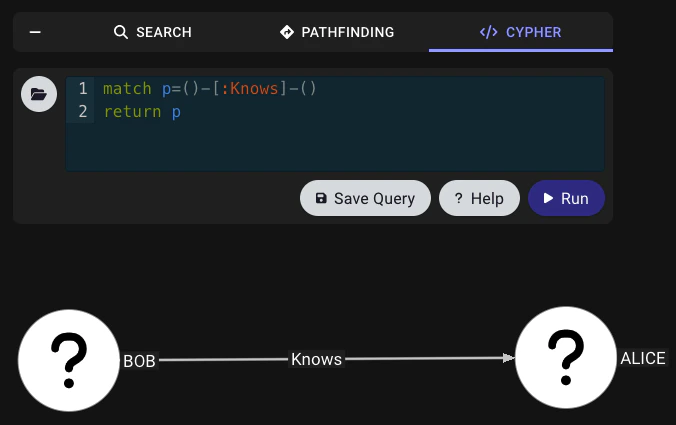
To test the ingestion in your BloodHound instance, navigate to **Explore** → **Cypher**. Enter the following query and hit `Run`:
```cypher theme={null}
match p=()-[:Knows]-()
return p
```
You should get something that looks like this:
An OpenGraph data payload is a JSON document generated by an OpenGraph collector and uploaded to BloodHound. It represents entities as nodes and relationships as edges so you can search, explore, and analyze your environment, including Attack Paths.
This page explains the structure and schema requirements for OpenGraph data payloads. It also provides a minimal viable payload example that you can use as a starting point for your own OpenGraph data.
## Before you begin
Full OpenGraph support requires a PostgreSQL graph database and one of the following editions:
* BloodHound Enterprise (uses PostgreSQL by default)
* BloodHound Community v8.0.0+ (requires changing to a [PostgreSQL database](/get-started/custom-installation#postgresql))
While many OpenGraph features may work on a Neo4j database, there are functional and performance limitations (see the [OpenGraph FAQ](/opengraph/faq#why-is-it-taking-so-long-to-ingest-opengraph-data)). For full support, migrate to a PostgreSQL database.
## File requirements
OpenGraph data payloads are accepted as `.json` files or `.zip` archives. A single upload operation can include a mix of valid `.json` and `.zip` files from different collectors (for example, SharpHound and OpenGraph). Additional constraints include:
* `.zip` archives can contain multiple `.json` payload files.
* Nested `.zip` archives are not supported.
* If you upload a `.zip` archive, every file in the archive must be a valid data payload.
## Data payload structure
All OpenGraph extensions must use the same data payload format. At minimum, a data payload must include the following top-level structure:
```json theme={null}
{
"graph": {
"nodes": [],
"edges": []
}
}
```
The `nodes` and `edges` arrays must conform to minimum JSON schemas. BloodHound validates that the JSON is well-formed and that nodes and edges meet these schema requirements, but it does not enforce additional structure or constraints beyond them.
For field-level details and schema requirements, see the following pages:
| Page | Description |
| ----------------------------------------- | -------------------------------------------------------------------------------------------------------- |
| [Metadata](/opengraph/developer/metadata) | Defines payload-wide ingest behavior to facilitate organizing and managing graph data by source. |
| [Nodes](/opengraph/developer/nodes) | Represents entities in your graph, such as users, devices, repositories, applications, and environments. |
| [Edges](/opengraph/developer/edges) | Represents relationships between nodes in your graph indicating some form of interaction or access. |
## Graph structure
To enforce additional structure beyond the minimum JSON schemas and enable advanced features in BloodHound, you can use an extension definition schema to define node and edge types, environments, and relationships.
When you upload a data payload that conforms to an installed extension definition schema, BloodHound produces a **structured graph** with enhanced features compared to a generic graph.
| Graph | Use this when |
| ------------------------------------------------------------------------------------------------------------------------------------------------------------------------------------------------------------- | ------------------------------------------------------------------------------------------------------------------------------- |
| Generic graph | You only need to ingest and [search](/analyze-data/explore/search#search) nodes and edges. |
| Structured graph | You need schema-driven [analysis](/analyze-data/findings/analysis) and [pathfinding](/analyze-data/explore/search#pathfinding). |
## Data source
OpenGraph extensions can collect data from many different systems. By default, BloodHound identifies this as *sourceless data*. If you're using multiple extensions, you may have multiple data sources feeding into your BloodHound graph database without any way to differentiate them.
To facilitate organizing and managing OpenGraph data in BloodHound, you can register a `source_kind` and apply it to the relevant nodes in your data payload. Once registered, BloodHound reuses it for subsequent uploads with the same node kinds, even if the data payload omits it.
For example, if you wanted to delete all data for a source, you could navigate to the **Administration** > **Database Management** page and select the name of the defined source.
You can still remove OpenGraph data without registering and applying a `source_kind` by checking the **Sourceless data** option. However, that could have unintended consequences if you have multiple OpenGraph data sources without a registered `source_kind`.
You can **register** a `source_kind` in two ways:
* Specify it in at least one payload's [`metadata`](/opengraph/developer/metadata) object. After that initial registration, later payloads can reuse it without re-registering it.
* Define it as an [`environments.source_kind`](/opengraph/developer/graph-definition#param-source-kind) value in an extension definition schema.
You can **apply** a `source_kind` in two ways:
* Specify it in the payload's [`metadata`](/opengraph/developer/metadata) object, which applies it to all defined nodes.
* Explicitly include it in a node's [`kinds`](/opengraph/developer/nodes#param-kinds) array, which applies it only to that node.
In structured graphs, nodes *must* include a registered `source_kind` to produce findings and metrics.
Specific [node properties](/opengraph/developer/nodes#findings-and-metrics) are also required to produce findings for structured graphs in BloodHound Enterprise.
The following points describe how `source_kind` influences metrics calculations:
* **Exposure metrics:** Traverse upstream toward the origin and stop when a node in the same zone is encountered (for Tier Zero paths, this means stopping when a Tier Zero node is reached). The origin node itself is not included.
* **Impact metrics:** Traverse downstream from the target node and include nodes in the same zone until the downstream set is fully enumerated.
## Minimal viable data payload
The following is a minimal example payload for a generic graph. You can use it as a starting point for your own OpenGraph data payload. Copy and paste the following example into a new `.json` file or download this example file.
When working with JSON files, use a plain text editor and UTF-8 encoding. Some
text editors may introduce unexpected, non-standard characters that can cause
parsing errors. It's always a good idea to validate your JSON with a
[linter](https://jsonlint.com/) before uploading it to BloodHound.
```json theme={null}
{
"graph": {
"nodes": [
{
"id": "123",
"kinds": ["Person"],
"properties": {
"displayname": "bob",
"name": "BOB"
}
},
{
"id": "234",
"kinds": ["Person"],
"properties": {
"displayname": "alice",
"name": "ALICE"
}
}
],
"edges": [
{
"kind": "Knows",
"start": {
"value": "123",
"match_by": "id"
},
"end": {
"value": "234",
"match_by": "id"
}
}
]
}
}
```
To test the ingestion in your BloodHound instance, navigate to **Explore** → **Cypher**. Enter the following query and hit `Run`:
```cypher theme={null}
match p=()-[:Knows]-()
return p
```
You should get something that looks like this:
 ## Troubleshooting
* **Upload fails before schema checks:** Confirm the file is valid JSON and encoded in UTF-8.
* **Upload fails with payload structure errors:** Confirm the payload has top-level `graph` with both `nodes` and `edges` arrays.
* **ZIP upload fails unexpectedly:** Ensure the archive does not contain nested ZIP files.
## Troubleshooting
* **Upload fails before schema checks:** Confirm the file is valid JSON and encoded in UTF-8.
* **Upload fails with payload structure errors:** Confirm the payload has top-level `graph` with both `nodes` and `edges` arrays.
* **ZIP upload fails unexpectedly:** Ensure the archive does not contain nested ZIP files.