> ## Documentation Index
> Fetch the complete documentation index at: https://bloodhound.specterops.io/llms.txt
> Use this file to discover all available pages before exploring further.
# SharpHound Enterprise Cross-Trust Collection
 By default, SharpHound Enterprise only collects data from the same domain the service account belongs to. However, it is possible to configure the collection scope to include domains trusting the service account domain.
## Configure SharpHound Enterprise Client for Cross-Trust Collection
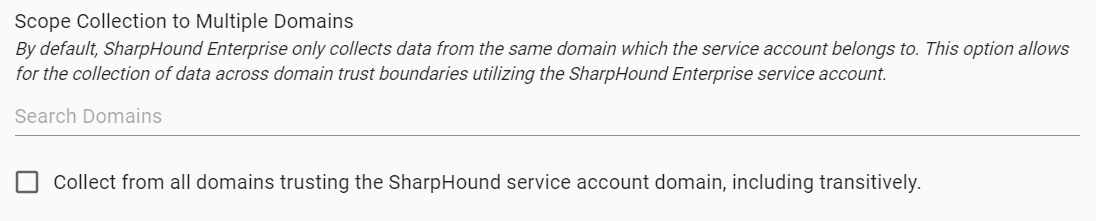
When configuring a SharpHound Enterprise client, it is possible to specify additional domains to be collected by entering domain names in "*Scope Collection to Multiple Domains*".
Alternatively, the SharpHound Enterprise client can collect from all domains trusting the service account domain by checking the option "*Collect from all domains trusting the SharpHound service account, including transitively".* This option will also collect from trusting domains in other forests.
By default, SharpHound Enterprise only collects data from the same domain the service account belongs to. However, it is possible to configure the collection scope to include domains trusting the service account domain.
## Configure SharpHound Enterprise Client for Cross-Trust Collection
When configuring a SharpHound Enterprise client, it is possible to specify additional domains to be collected by entering domain names in "*Scope Collection to Multiple Domains*".
Alternatively, the SharpHound Enterprise client can collect from all domains trusting the service account domain by checking the option "*Collect from all domains trusting the SharpHound service account, including transitively".* This option will also collect from trusting domains in other forests.
 If selective authentication is enabled on a trust, the SharpHound Enterprise service account must explicitly be granted read permissions on all AD objects in all domains of the targeted forest to perform collection.
## Collection Across External Trust
Kerberos authentication works by default for all Active Directory trust types except external trusts. SharpHound Enterprise supports collection across external trusts via two mechanisms.
### Forest Search Order (preferred)
Administrators can enable Kerberos authentication across external trusts by adding the name of the other domain to the [Use forest search order](https://learn.microsoft.com/en-us/previous-versions/windows/it-pro/windows-server-2008-r2-and-2008/hh920181\(v=ws.10\)) policy setting on Domain Controllers.
If selective authentication is enabled on a trust, the SharpHound Enterprise service account must explicitly be granted read permissions on all AD objects in all domains of the targeted forest to perform collection.
## Collection Across External Trust
Kerberos authentication works by default for all Active Directory trust types except external trusts. SharpHound Enterprise supports collection across external trusts via two mechanisms.
### Forest Search Order (preferred)
Administrators can enable Kerberos authentication across external trusts by adding the name of the other domain to the [Use forest search order](https://learn.microsoft.com/en-us/previous-versions/windows/it-pro/windows-server-2008-r2-and-2008/hh920181\(v=ws.10\)) policy setting on Domain Controllers.
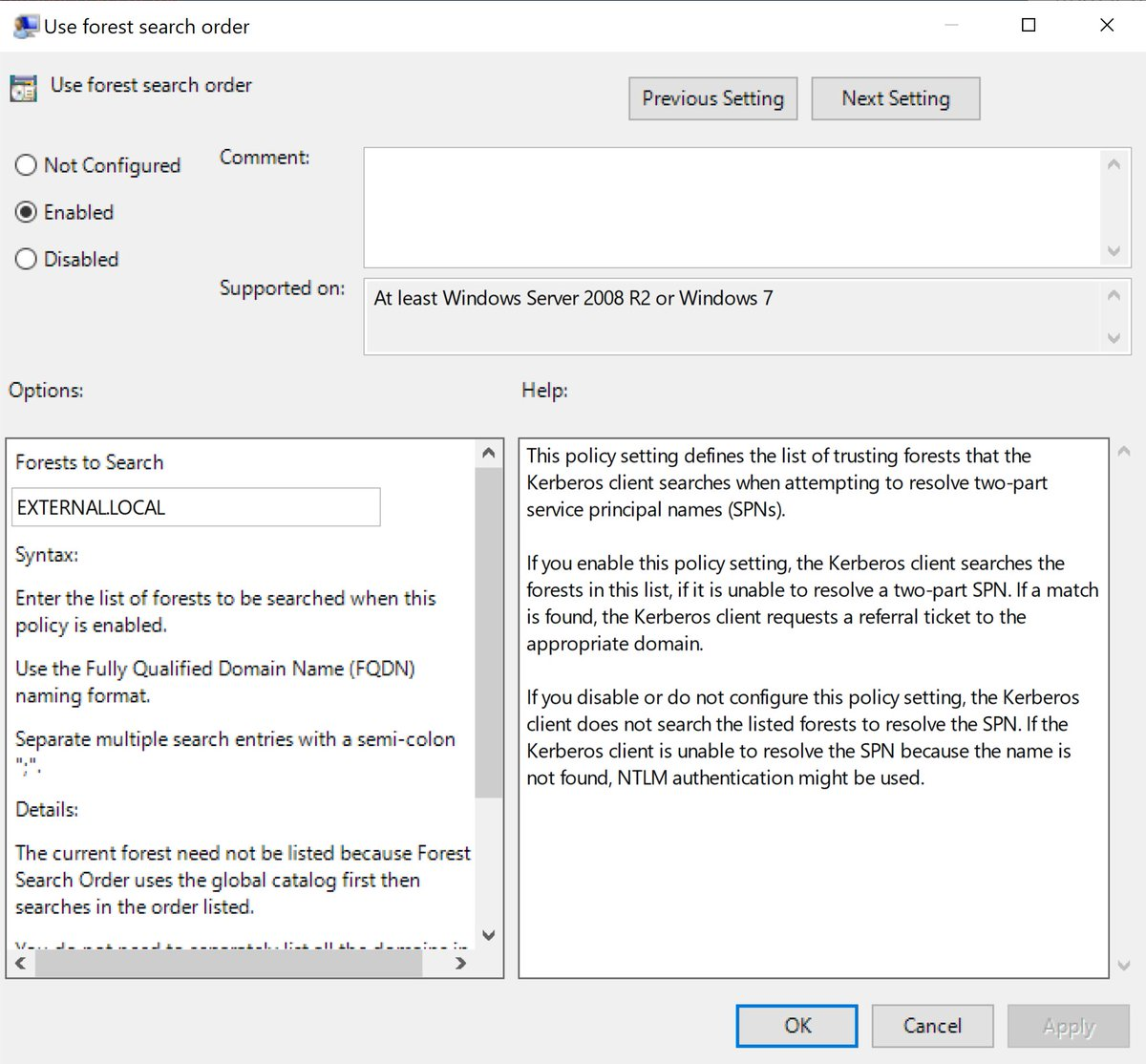 We recommend deploying this setting to all Domain Controllers in domains with external trusts to avoid using the older and less secure NTLM authentication.
### LDAP Authentication Auto-Negotiation
SharpHound Enterprise will, by default, only support Kerberos authentication for the LDAP connections to Domain Controllers for Active Directory Structure Data collection. This will cause the collection across the external trust to fail without modifying SharpHound's default behavior in the configuration file "settings.json". The configuration file default path is described in [SharpHound Enterprise Local Configuration](/install-data-collector/install-sharphound/local-configuration).
To enable support for auto-negotiation in LDAP connections:
1. Stop the SharpHound Delegator service.
2. Open settings.json as an Administrator (right click -> Run as Administrator on notepad.exe)
3. Change the ForceLDAPKerberosAuth setting to False (no quotes)
4. Save settings.json
5. Start the SharpHound Delegator service.
If NTLM-fallback is enabled, we recommend denying outbound NTLM authentication from the SharpHound server to all servers except Domain Controllers in domains with external trust relationships, as described in [SharpHound Service Hardening Guidelines](/manage-bloodhound/securing-bloodhound-and-collectors/sharphound-hardening) in the *NTLM cracking (and relaying) remediation* section.
## Troubleshoot Cross-Trust Collection
The collection across a trust will fail if:
* The Kerberos-supported encryption types between domains/forests do not match.
* Authentication has been restricted, e.g., using authentication policy silos or IPSec.
* There is no network access from the SharpHound server to the trusting domain's DCs and domain-joined Windows systems in scope for privileged collection.
We recommend deploying this setting to all Domain Controllers in domains with external trusts to avoid using the older and less secure NTLM authentication.
### LDAP Authentication Auto-Negotiation
SharpHound Enterprise will, by default, only support Kerberos authentication for the LDAP connections to Domain Controllers for Active Directory Structure Data collection. This will cause the collection across the external trust to fail without modifying SharpHound's default behavior in the configuration file "settings.json". The configuration file default path is described in [SharpHound Enterprise Local Configuration](/install-data-collector/install-sharphound/local-configuration).
To enable support for auto-negotiation in LDAP connections:
1. Stop the SharpHound Delegator service.
2. Open settings.json as an Administrator (right click -> Run as Administrator on notepad.exe)
3. Change the ForceLDAPKerberosAuth setting to False (no quotes)
4. Save settings.json
5. Start the SharpHound Delegator service.
If NTLM-fallback is enabled, we recommend denying outbound NTLM authentication from the SharpHound server to all servers except Domain Controllers in domains with external trust relationships, as described in [SharpHound Service Hardening Guidelines](/manage-bloodhound/securing-bloodhound-and-collectors/sharphound-hardening) in the *NTLM cracking (and relaying) remediation* section.
## Troubleshoot Cross-Trust Collection
The collection across a trust will fail if:
* The Kerberos-supported encryption types between domains/forests do not match.
* Authentication has been restricted, e.g., using authentication policy silos or IPSec.
* There is no network access from the SharpHound server to the trusting domain's DCs and domain-joined Windows systems in scope for privileged collection.