> ## Documentation Index
> Fetch the complete documentation index at: https://bloodhound.specterops.io/llms.txt
> Use this file to discover all available pages before exploring further.
# Attack Paths
> Learn how to interpret Attack Path findings and use them to prioritize remediation efforts.
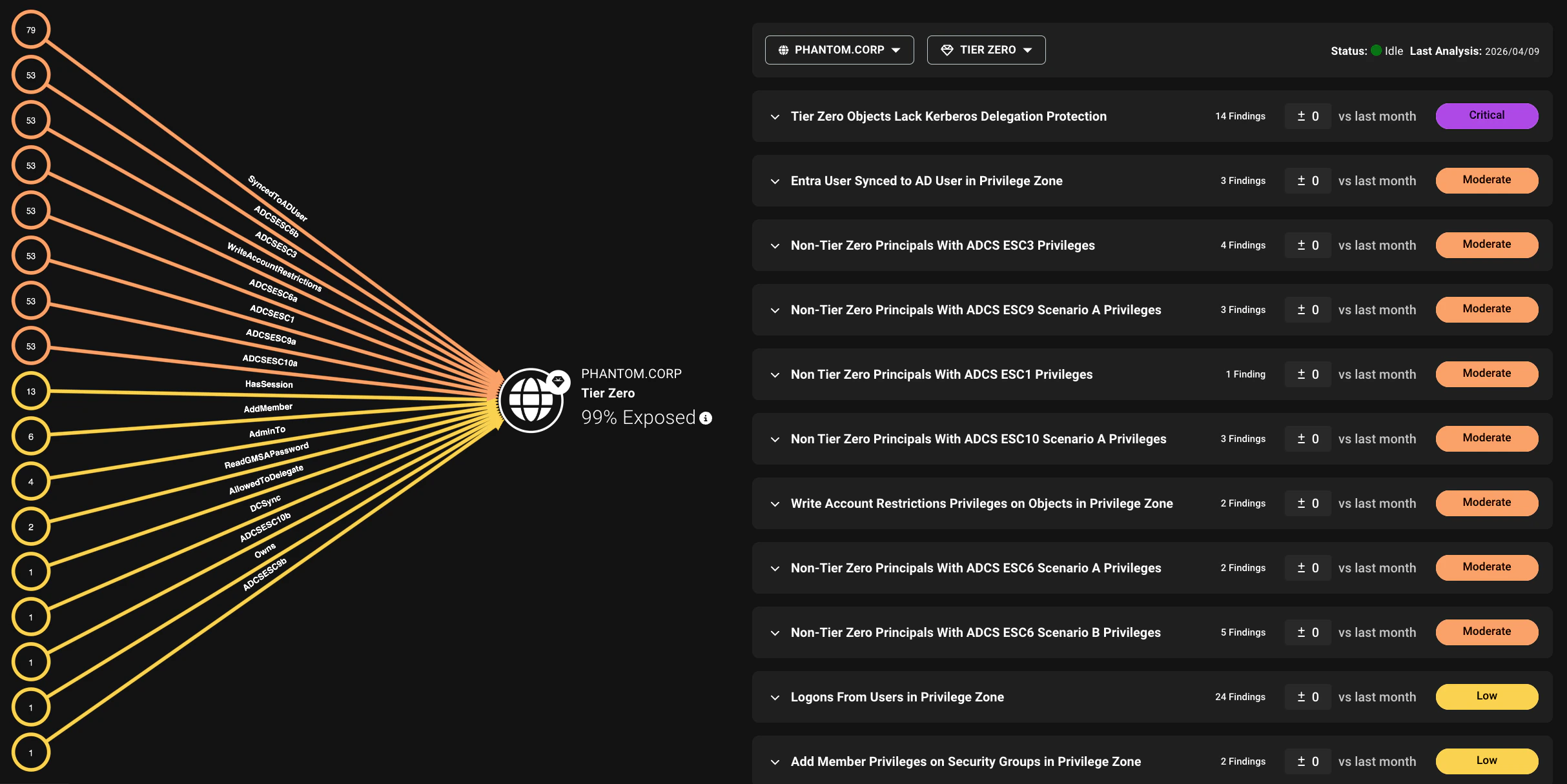
 The **Attack Paths** page in BloodHound Enterprise gives you a high-level overview of where identity risk exists, how much of your environment is exposed, and which areas need attention first.
These risks are represented as findings with exposure and impact metrics that quantify risk, so you can quickly assess overall risk in one place and then use those metrics to inform prioritization as you drill into specific finding types.
The **Attack Paths** page combines two key views needed for prioritization:
* **Choke Point view**: An aggregate view of the graph for a selected environment and privilege zone. This view simplifies large volumes of nodes and edges into a compact visualization optimized for readability. It shows the number of exposed principals in each finding category, giving you a quick summary of where risk concentrates in an environment.
* **Attack Paths details**: An expandable list of all Attack Path types detected, showing detailed finding descriptions, severity, principals involved, exposure and impact, and remediation plans for each.
The **Attack Paths** page in BloodHound Enterprise gives you a high-level overview of where identity risk exists, how much of your environment is exposed, and which areas need attention first.
These risks are represented as findings with exposure and impact metrics that quantify risk, so you can quickly assess overall risk in one place and then use those metrics to inform prioritization as you drill into specific finding types.
The **Attack Paths** page combines two key views needed for prioritization:
* **Choke Point view**: An aggregate view of the graph for a selected environment and privilege zone. This view simplifies large volumes of nodes and edges into a compact visualization optimized for readability. It shows the number of exposed principals in each finding category, giving you a quick summary of where risk concentrates in an environment.
* **Attack Paths details**: An expandable list of all Attack Path types detected, showing detailed finding descriptions, severity, principals involved, exposure and impact, and remediation plans for each.
 ## Filters
The **Attack Paths** page includes filters to help you focus on specific environments and zones. You can use these filters to narrow down the findings shown in the **Choke Point** view and the **Attack Paths details** list to focus on specific areas of your environment.
* **Environment**: Filter findings by specific platforms, such as an Active Directory domain, Azure tenant, or OpenGraph environment. You can also filter on severity levels to focus on high-risk Attack Paths.
* **Zone**: Filter findings by specific privilege zones. By default, Tier Zero is selected, but you can choose to view findings for other zones.
You can also use the zone filter to focus on findings by the Hygiene category.
## Findings
An **Attack Path** is a chain of abusable privileges and user behaviors that creates direct or indirect connections between principals.
A **finding** is a specific instance of an Attack Path that BloodHound Enterprise has identified as a high-value remediation point. Findings can be relationship-based (abusable paths between principals) or principal-based (risky configurations on a principal).
Findings are organized by the environment of the target nodes, not the environment where the finding is defined.
For example, an OpenGraph extension can define a finding that targets Active Directory nodes. That finding appears under the relevant Active Directory domain, not the OpenGraph environment.
### Exposure and impact
Each finding includes exposure and impact metrics. Use these metrics together when prioritizing remediation efforts.
Findings with high exposure and high impact are typically the highest-priority remediation targets.
#### Exposure
A risk measurement that quantifies the extent to which principals can reach a privileged asset through one or more Attack Paths. It encompasses all principals upstream of a finding's source, including any principals that can reach the source through intermediaries.
Exposure is measured in two ways:
* **Exposure count**—The number of principals that can reach a privileged asset through one or more Attack Paths.
* **Exposure percentage**—The percentage of principals in an environment that have at least one Attack Path to a privileged asset.
Exposure calculation only includes principals *outside* the selected zone (and higher zones) that can reach a privileged asset through an Attack Path.
#### Impact
A risk measurement that quantifies potential blast radius if a finding is abused.
Impact is measured in two ways:
* **Impact count**—The number of principals that could be compromised through an Attack Path.
* **Impact percentage**—The percentage of the environment that could be impacted by a specific identity vulnerability.
Together, these metrics help organizations prioritize remediation by understanding which Attack Paths pose the greatest risk.
### Finding types
BloodHound Enterprise groups findings into types to help you separate structural access risks from principal-level configuration risks.
#### Relationship-based finding
A relationship-based finding identifies a directional path from a lower-privileged source principal to a privileged target asset.
The path represents one or more abusable connections (potentially through intermediate principals or objects) through which the source principal can take control of the target. A single finding may include multiple Attack Paths when different intermediate nodes all enable the same type of access from source to target.
Relationship-based findings can have an exposure metric and an impact metric.
#### List-based finding
A list-based finding identifies a vulnerability in a specific principal where the risk originates from the principal itself (like a misconfiguration).
Because the vulnerability is inherent to the principal and not based on its connection to other principals, there is no exposure to measure.
List-based findings do not have an exposure metric, but they will have an impact metric.
## Filters
The **Attack Paths** page includes filters to help you focus on specific environments and zones. You can use these filters to narrow down the findings shown in the **Choke Point** view and the **Attack Paths details** list to focus on specific areas of your environment.
* **Environment**: Filter findings by specific platforms, such as an Active Directory domain, Azure tenant, or OpenGraph environment. You can also filter on severity levels to focus on high-risk Attack Paths.
* **Zone**: Filter findings by specific privilege zones. By default, Tier Zero is selected, but you can choose to view findings for other zones.
You can also use the zone filter to focus on findings by the Hygiene category.
## Findings
An **Attack Path** is a chain of abusable privileges and user behaviors that creates direct or indirect connections between principals.
A **finding** is a specific instance of an Attack Path that BloodHound Enterprise has identified as a high-value remediation point. Findings can be relationship-based (abusable paths between principals) or principal-based (risky configurations on a principal).
Findings are organized by the environment of the target nodes, not the environment where the finding is defined.
For example, an OpenGraph extension can define a finding that targets Active Directory nodes. That finding appears under the relevant Active Directory domain, not the OpenGraph environment.
### Exposure and impact
Each finding includes exposure and impact metrics. Use these metrics together when prioritizing remediation efforts.
Findings with high exposure and high impact are typically the highest-priority remediation targets.
#### Exposure
A risk measurement that quantifies the extent to which principals can reach a privileged asset through one or more Attack Paths. It encompasses all principals upstream of a finding's source, including any principals that can reach the source through intermediaries.
Exposure is measured in two ways:
* **Exposure count**—The number of principals that can reach a privileged asset through one or more Attack Paths.
* **Exposure percentage**—The percentage of principals in an environment that have at least one Attack Path to a privileged asset.
Exposure calculation only includes principals *outside* the selected zone (and higher zones) that can reach a privileged asset through an Attack Path.
#### Impact
A risk measurement that quantifies potential blast radius if a finding is abused.
Impact is measured in two ways:
* **Impact count**—The number of principals that could be compromised through an Attack Path.
* **Impact percentage**—The percentage of the environment that could be impacted by a specific identity vulnerability.
Together, these metrics help organizations prioritize remediation by understanding which Attack Paths pose the greatest risk.
### Finding types
BloodHound Enterprise groups findings into types to help you separate structural access risks from principal-level configuration risks.
#### Relationship-based finding
A relationship-based finding identifies a directional path from a lower-privileged source principal to a privileged target asset.
The path represents one or more abusable connections (potentially through intermediate principals or objects) through which the source principal can take control of the target. A single finding may include multiple Attack Paths when different intermediate nodes all enable the same type of access from source to target.
Relationship-based findings can have an exposure metric and an impact metric.
#### List-based finding
A list-based finding identifies a vulnerability in a specific principal where the risk originates from the principal itself (like a misconfiguration).
Because the vulnerability is inherent to the principal and not based on its connection to other principals, there is no exposure to measure.
List-based findings do not have an exposure metric, but they will have an impact metric.